


When it launched in 2002, Jira by Atlassian was synonymous with two things: task tracking, and software engineering. But, over the last two decades, Jira has evolved to be a tool for teams who plan, track, and deliver projects—regardless of department or industry.
As Jira’s adoption has grown outside of technical teams, people responsible for resource management in those departments have started exploring what can be achieved on the tool. But, unfortunately, many find themselves running into limitations.
Before we start exploring what these restrictions are, let’s draw a line in the sand to make it clear what we mean by “resource management”:
Resource management is the overarching discipline of managing people, equipment, and resources including planning resources and capacity, allocating, scheduling, tracking, and forecasting resources, as well as monitoring utilization.
This article covers the best features available for using Jira for resource management, as well as areas where there’s room for improvement. In it, I’ll share resource management techniques and tools that go beyond what’s possible in Jira, and that give you a holistic way to manage people and resources.
Spoiler alert: That’s where Resource Guru comes in.
TL;DR
My ultimate recommendation is that you can’t accomplish all you need to with just Jira when it comes to resource management.
So, you should either use it in combination with a purpose-built resource management solution like Resource Guru, or transition to a dedicated solution entirely.
With that in mind, this article will cover everything you need to level-up your approach to resource management.
To get things started—and justify that TL;DR up there—let’s look at a side-by-side comparison of Jira and Resource Guru in more detail to understand what the drawbacks and opportunities are.
In this article 📖
Jira resource management vs. Resource Guru resource management
As I touched on in the definition above, resource management is an umbrella term. It’s an overall process made up of a number of distinct stages, each with different purposes and steps.
I’ll elaborate on each of them in a bit, but here’s a quick snapshot of how resource management in Jira compares to resource management in Resource Guru, broken down by stage:
Resource management stage | Supporting Jira functionality | Supporting Resource Guru functionality |
Resource planning | 🔴 Very limited - Team-space linking | 🟢 Advanced - Tentative bookings, resource placholders, equipment management |
Capacity planning | 🟠 Limited - Time estimates, issue grouping | 🟢 Advanced - Time off tracking, availability bars, clash management, custom availability, heatmaps |
Resource allocation | 🟠 Limited - Task assignments, priority statuses | 🟢 Advanced - Sorting, grouping, filtering, project rates, project budgets, custom fields |
Resource scheduling | 🔴 Very limited - Calendar view | 🟢 Advanced - Customizable schedule, repeat bookings, timezone support, approval workflow, Waiting List |
Resource tracking | 🟠 Limited - Time estimates | 🟢 Advanced - Timesheets |
Resource utilization | 🟠 Limited - Time tracking and user workload reports | 🟢 Advanced - Availability heatmaps, timesheets, capacity/utilization (both billable and non-billable) tracking and reporting |
Resource forecasting | 🔴 Very limited - Timeline view | 🟢 Advanced - Full reporting suite |
Can Jira be used for resource management?
For some aspects of resource management, using Jira can be suitable (and we’ll cover those in dedicated sections later.) However, Jira is better thought of as a task manager than a complete solution for resource management.
As the table above shows, Jira provides some of the tools you need for various steps, like a basic calendar view of tasks, and the ability to assign individuals to tasks. However, many teams require more in-depth functionality specifically for resource management.
In later sections, I’ll speak to each aspect of resource management in more depth, covering how Jira enables you to achieve some of the necessary tasks.
How to do resource management in Jira
As I’ve said, there are multiple parts that make up resource management, so I’ll need a little more real estate to cover each of them in terms of how to perform resource management using Jira.
Click here to jump to how to use Jira for resource management across different stages
But, for the time being, let’s talk about three things that make resource management with Jira infinitely more effective. Namely, using a Jira resource management plugin, extensions, or integrations.
Here’s a quick breakdown of the difference between those, if you want to use Jira as part of your resource management process:
Term | Where it runs | Purpose |
Plugin | Inside Jira | Adds to or modifies Jira’s functionality |
Extension | Inside Jira | Enhances existing Jira capabilities (i.e. its UI and feature set) |
Integration | Outside Jira | Connects Jira to other apps and tools |
Of course, you can also just use a completely dedicated tool separately, but if I had to pick just one of the above options, it’d have to be an integration.
While plugins can alter bits and pieces of functionality inside Jira, you’d fundamentally be building on a foundation that wasn’t meant for resource management in the first place. The same is true of extensions.
On the flip side, integrating Jira with a dedicated resource management solution gives you the full set of functionality you need to pull off something as complex as resource management, all while giving you access to tasks in Jira. This makes it the most holistically effective approach.
How does Resource Guru integrate with Jira?
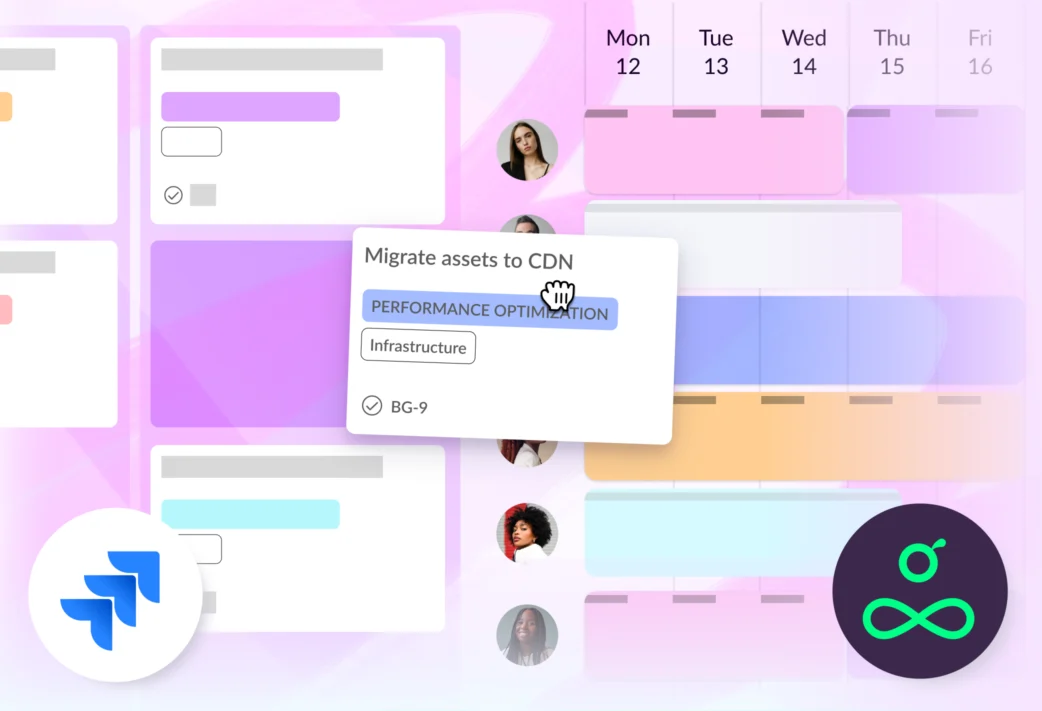
The Resource Guru x Jira integration is a fully native solution. Using it, tickets get pushed to Resource Guru in real-time via one-way sync where they’re available in a list beside the schedule.
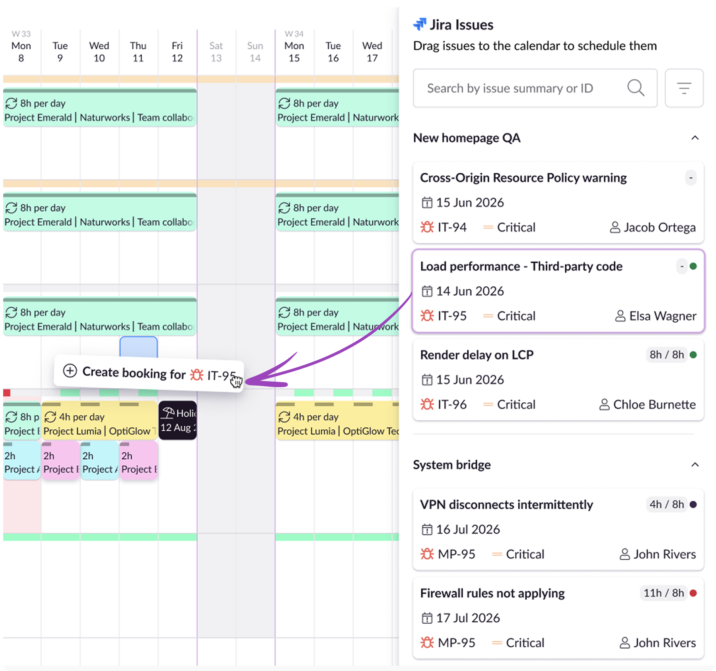
From there you can drag and drop the tickets to create bookings against them. And, if you’re using time estimates in Jira, you can compare to see how much time has been scheduled for each ticket, and how much more you should schedule.
In the following sections I’ll also speak more to the advantages of using a Jira integration like this as we explore the capabilities throughout each stage of the resource management process.
How to do resource planning in Jira
Before I dive into the practicalities, here’s another quick definition to set the scene:
Resource planning involves identifying what resources are needed for your plans—either on a task, or project level, or a wider business level.
Unfortunately, this means using Jira for resource planning is one of the trickier aspects of resource management to pull off if you’re using the platform on its own. That said, here’s what you can accomplish with the basic functionality.
Jira resource planning using built-in features
Resource planning in Jira is quite rigid. While you can assign people to work and you have some flexibility around finding what people are needed for the job, it’s hard to get full context on what else they’re working on, and how suitable they are for the type of work at hand.
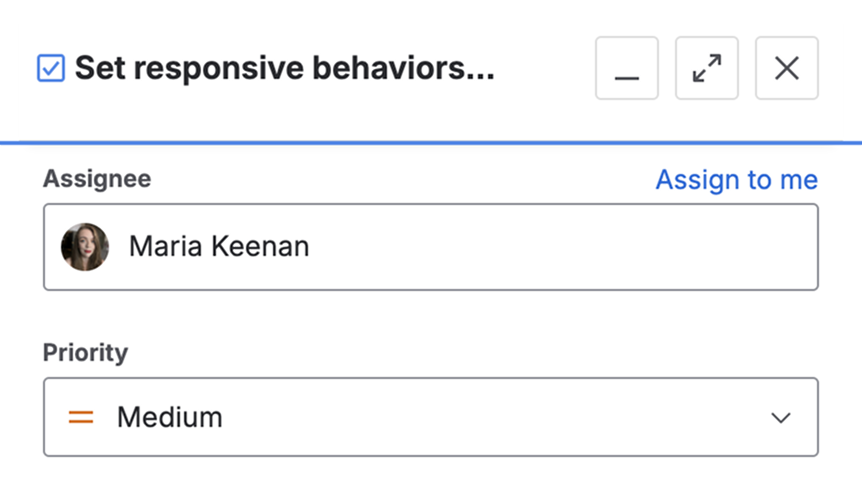
Jira resource planning: What you can do on the platform
- You can link Jira spaces to teams that include a list of suitable people to work on associated issues. You can choose from that list of people and assign them to tasks
Jira resource planning: What you can’t do on the platform
- The no mechanism for differentiating unconfirmed work from confirmed work making identifying resource needs quite tricky
- Jira’s designed for assigning people to work. There’s no out-of-the box way to do resource planning for equipment or other resources
“Jira makes resource planning harder. It assumes everyone is full time, but many of our employees work varying contracts. This level of detail seemed too complex for Jira.”
— Jack Mellor, Managing Director at Personnel Checks

Resource planning: Jira integrated with Resource Guru
On the flip side, with a dedicated solution like Resource Guru, resource planning gets a whole lot smoother. Here are a few examples:
- Equipment management means you can plan how equipment and other non-human resources will be used throughout projects
- Tentative bookings let you reserve time for work before it’s locked in
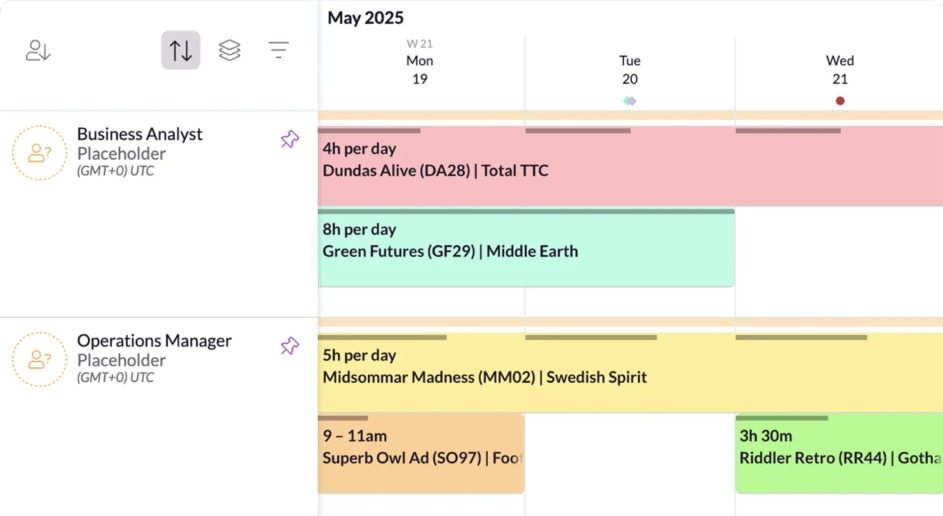
Feature spotlight:
Resource placeholders
Prepare for unconfirmed work ahead of time, fill resource gaps, and make confident resource planning decisions.

“Wide capabilities for resource planning alongside a user-friendly interface make life easier.”
— George Lashki on G2.
Further reading: Explore all the benefits of integrating Jira with Resource Guru for smoother planning, scheduling, and all around resource management.
How to do capacity planning in Jira
Let’s define this stage too before we get into it:
Capacity planning is a long-term, strategic process that determines the overall capacity an organization needs to meet future demand and goals. It can refer to many different types of capacity, for example planning storage/network capacity or planning capacity for physical spaces/infrastructure. However, capacity planning most likely refers to the planning of resources specifically (e.g. people or equipment) for an organization.
Jira capacity planning using built-in features
In terms of capacity planning tools, Jira falls quite short when used in isolation. While you can leverage some features to do certain aspects, there aren’t any truly dedicated features for team capacity planning in Jira.
Jira capacity planning: What you can do on the platform
- On Jira, team capacity planning is restricted to understanding how much time and effort the work will take as opposed to how much availability someone has to do that work. You can use time estimates to track this
- You can roughly calculate the workload per person on an individual level by grouping issues by assignee in certain views. To go any deeper, you’d need to explore if there is a suitable capacity planning plugin for Jira
Jira capacity planning: What you can’t do on the platform
- There’s no official time-off tracking in Jira that comes out of the box meaning you can’t account for downtime when doing capacity planning
- There is no default view for actual availability versus estimated availability
- By default, there are no automated warnings when someone goes over capacity
“On Jira, I can’t do real capacity planning because there’s no view of who’s available versus what needs doing over time.”
— Michal Kierul, CEO at InTechHouse

Capacity planning: Jira integrated with Resource Guru
Compared to the limited number of Jira capacity planning features, capacity planning in Resource Guru is highly detailed. With multiple dedicated features, you can balance workloads among your team to keep them productive.
- Time off tracking makes it easy to plan for the capacity you’ll have available while people are on vacation, off sick, or taking other time off
- Availability bars give you an indication of how much capacity a person or piece of equipment has left in a given day
- Clash management stops people and resources from getting double-booked so you have accurate insight into how much time they have remaining to complete work
- Custom availability lets you take individual working hours into account and flexibly adjust them as people’s capacity changes
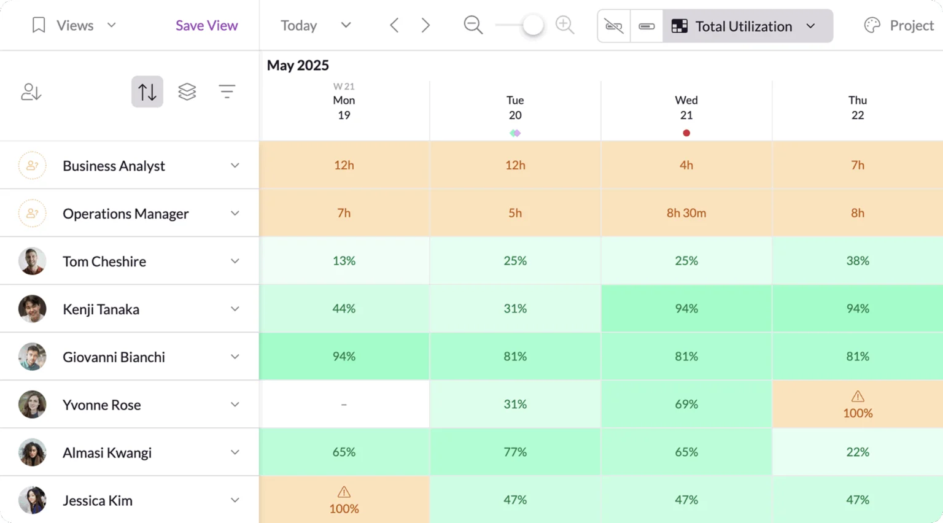
Feature spotlight:
Availability heatmaps
Quickly assess your team’s capacity using color-coded heatmaps that highlight excessive—or lacking—availability.
“It’s compact, organised, user friendly and I love that it shows current capacity.”
— Verified review on G2.
How to manage resource allocation in Jira
Definition time once again:
Resource allocation involves identifying who will do the work, and then assigning and distributing the work among the people and resources who will get it over the line. This will be based on skills, availability, and project priority.
Jira resource allocation using built-in features
Allocating a person to a task is easy in Jira. It’s just a matter of clicking a dropdown list and selecting someone. However, the real missing link for successful resource allocation in Jira is getting a wider view of what else that person is working on.
If they’re assigned to multiple high-priority tasks, it can be hard to choose which of those tasks is truly the highest priority, if they have limited time to complete them.
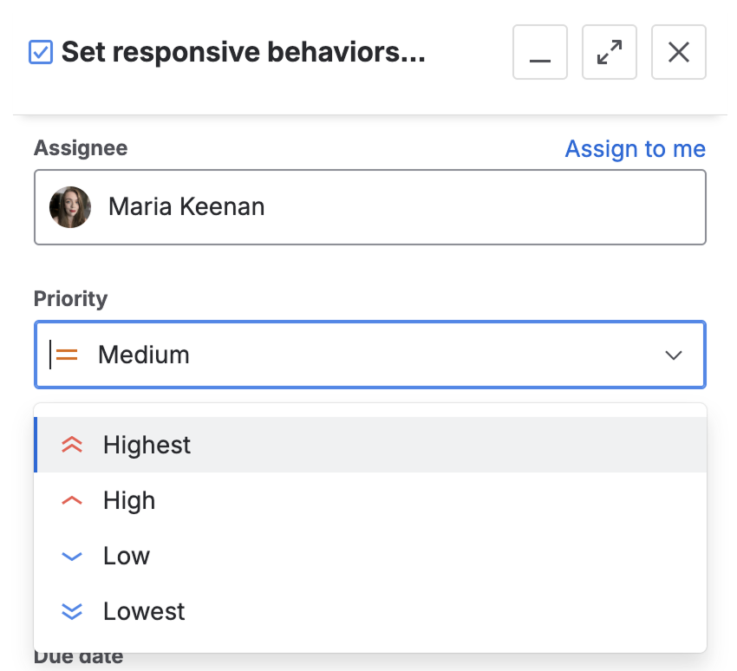
Jira resource allocation: What you can do on the platform
- You can assign one person to each task by default
- You can assign multiple people to subtasks
- You can easily assign people to tasks on Jira, though you lack some critical context about their availability and capacity
- You can set a priority per task in Jira which shows how urgent it is
Jira resource allocation: What you can’t do on the platform
- There’s no way to view availability in terms of how much work from other projects is consuming someone’s time
- Skills management is not a native Jira feature meaning you can only find potential assignees who are suitable for specific tasks using a Jira resource planning plugin or an integration
Resource allocation: Jira integrated with Resource Guru
Resource Guru provides a variety of ways to allocate resources that are informed by variables that are uniquely important to your business, and historical data.
- Sort, group, and filter the schedule (more on that in the next section) to quickly navigate to who and what you need to make bookings for
- Set project rates and budgets to know who you can afford to assign to certain projects—especially useful if you work with clients
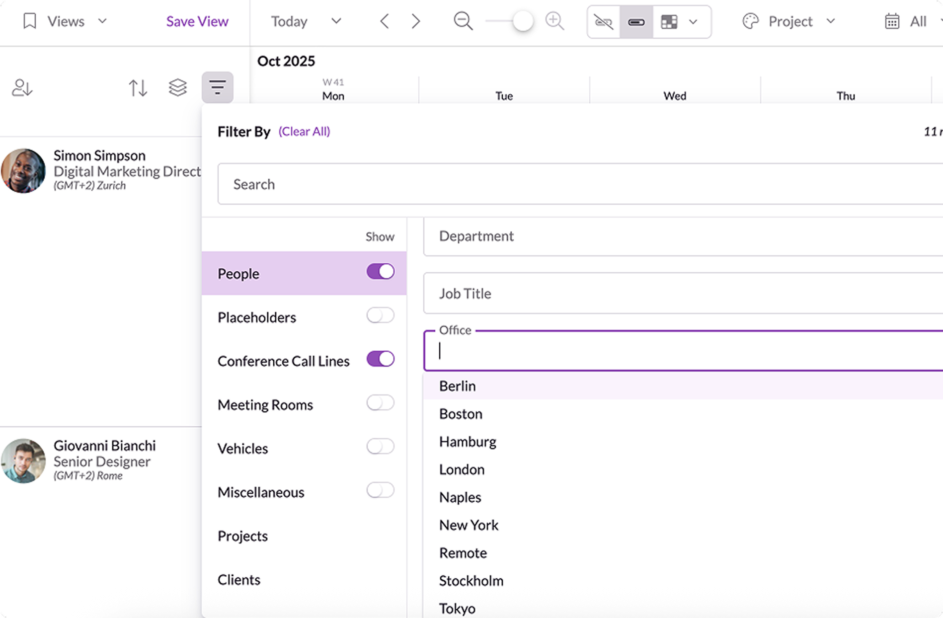
Feature spotlight: Custom fields
Set organization-specific variables about projects, clients, bookings, people, and equipment to use across the schedule and reports.
“Resource Guru helps our team collaborate on resource allocation, making it easier to find the best way to distribute workload.”
— Cecilia Giraudo on G2.
How to schedule resources with Jira
Another quick definition before we go deep:
Resource scheduling involves scheduling when the people will do the work for the tasks or projects over time, to meet specific goals, milestones, and deadlines.
Jira resource scheduling using built-in features
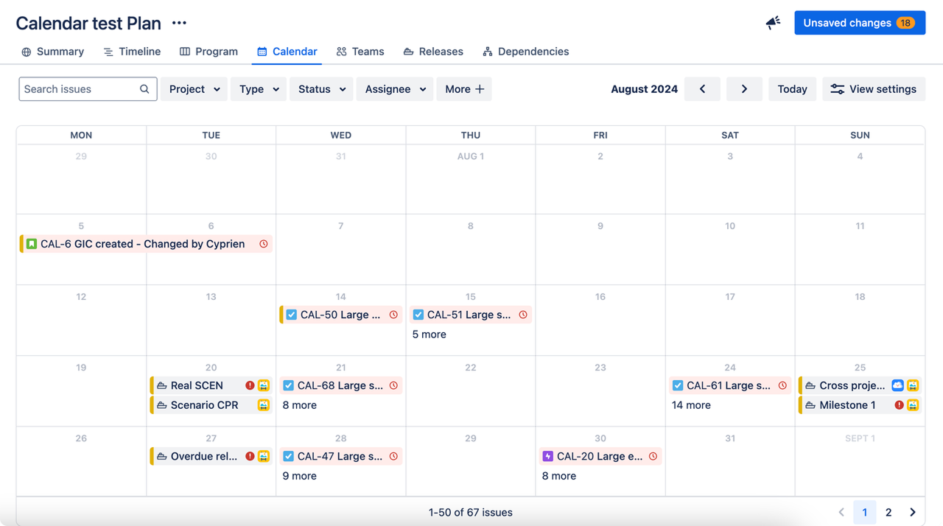
While Jira now offers a calendar view, this is unfortunately one of its weaker points in the resource management mix. The functionality is quite limited and inflexible; essentially just displaying a list of tasks laid out against different dates. For true resource scheduling, you need the ability to make swift changes as plans change.
Jira resource scheduling: What you can do on the platform
- You can view tasks in a calendar view based on their start and end dates
- You can move issue dates around using drag and drop
- You can extend or contract issue durations in the calendar view
Jira resource scheduling: What you can’t do on the platform
- You can’t create new issues from the calendar view
- Any issues that don’t have a start or end date assigned don’t show on the calendar
- The calendar isn’t broken down by person or resource, so you can’t see granular information on that level at a glance, though you can filter the schedule by assignee to see one person at a time
Resource scheduling: Jira integrated with Resource Guru
Resource scheduling is a core part of Resource Guru. And it’s hard to argue with the reviews on sites like G2. Here are a few functionality highlights:
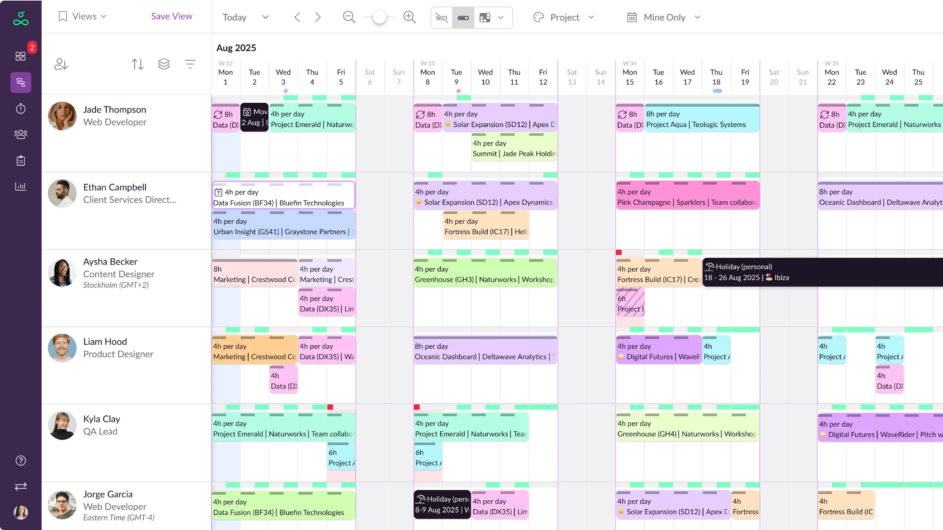
- The schedule itself offers a bird’s eye view of all your people and resources so you can quickly assess how best to make resource scheduling decisions
- As mentioned above, you can sort, group, and filter the schedule for faster navigation. You can also save and share views to collaborate with other people involved in resource scheduling
- Repeat bookings let you set recurring instances for work that happens regularly
- Timezone support means you can confidently create bookings for team members worldwide, without the mental battle against daylight savings time
- Approval workflows let you protect in-demand people from overworking
- The Waiting List keeps track of unconfirmed bookings when people or resources don’t have enough availability—an organized way to get that work scheduled effectively and protect people’s time
Feature spotlight:
Customizable schedule
Customize your team’s schedule by saving and sharing views, pinning high priority people and resources, and color-coding bookings.
“If you are looking for an easy to use and clear resource scheduling product, look no further! Resource Guru has simplified the lives of my team.”
— Russ Uthe on G2.
How to do resource tracking in Jira
Here’s what I mean by resource tracking, just so we’re on the same page here too:
Resource tracking is the process of monitoring how people and resources are being used in real time, and could include different areas of measurement such as time, budget, or utilization.
Jira resource tracking using built-in features
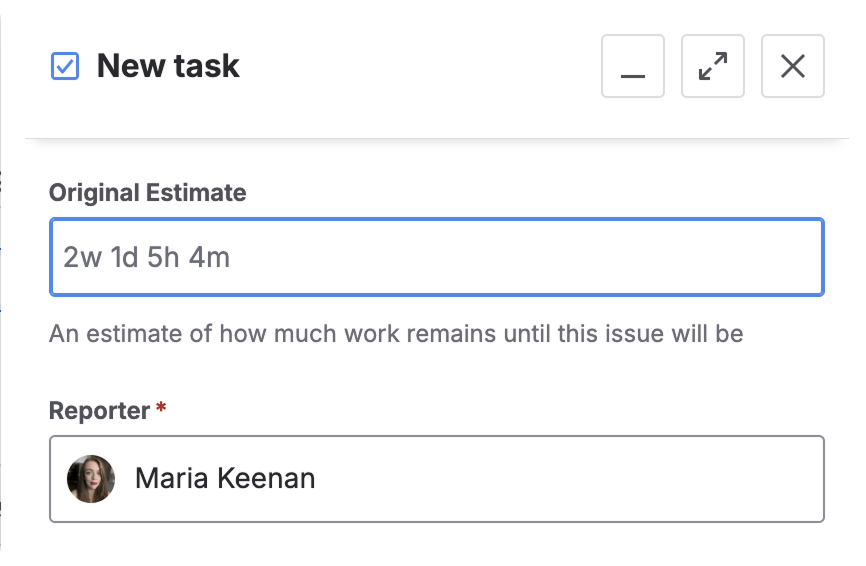
We touched on Jira time estimates before, but that’s the core of the platform’s native resource tracking capabilities. As the name suggests, these are just approximations of how much time is needed to complete tasks. Detailed resource tracking requires more accuracy to be fully effective.
Jira resource tracking: What you can do on the platform
- Jira lets you set time estimates, and see a visual breakdown of logged time versus remaining time
Jira resource tracking: What you can’t do on the platform
- Jira does not provide similar monetary estimates per issue
Resource tracking: Jira integrated with Resource Guru
Resource Guru streamlines how people log their time so you get more accurate data.
- Bookings made in the schedule create timesheet entries automatically so your team doesn’t have to rely on memory to log work they’ve completed
- Your team can then bulk log entries in a few clicks—meaning they can log a week’s work in seconds
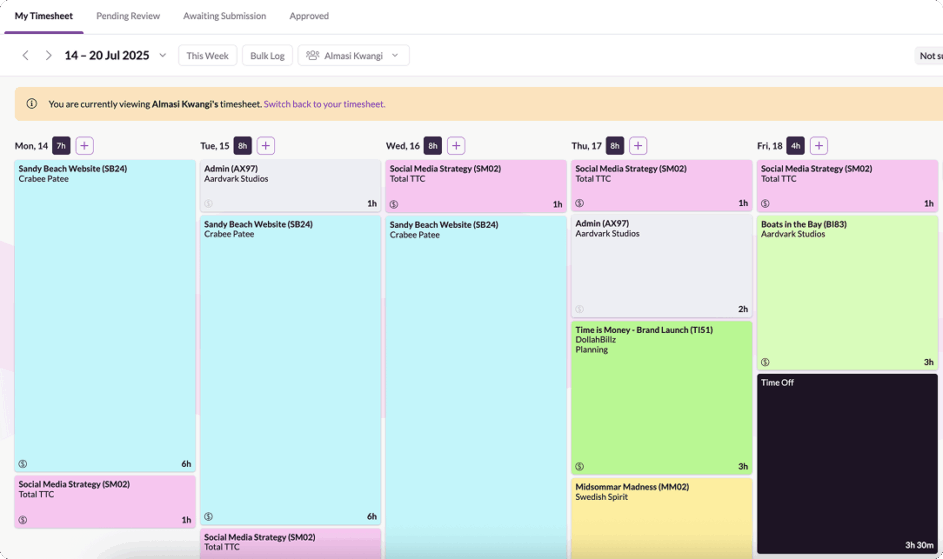
Feature spotlight: Timesheets
Schedule and track time in one place. Fine-tune forecasting and boost billable hours with quick-to-complete timesheets.
“Easy to use, enjoyable time management that keeps you on track.”
— Mark Watts on G2.
How to track resource utilization in Jira
Let’s define this one too to set the scene:
Resource utilization is a resource tracking metric that tracks how efficiently people and resources are being leveraged for tasks or projects.
Usually it’s measured in percentages that reflect what proportion of the person or resource’s availability is used.
It can also be broken into billable and non-billable utilization.
Jira resource utilization monitoring using built-in features
Utilization is business-critical if you want to ensure people don’t get overburdened or left twiddling their thumbs. Unfortunately, Jira doesn’t come with a built-in utilization report, but there are some ways to manage utilization on a high level on the platform.
Jira resource utilization: What you can do on the platform
- Basic built-in Time Tracking and User Workload resource utilization reports in Jira let you sense-check how much time tasks take and how many tasks are assigned to individuals, but you cannot natively compare this against capacity
Jira resource utilization: What you can’t do on the platform
- There’s no out-of-the-box utilization calculation or reporting meaning you would have to use a plugin or integration to get this data
Resource utilization: Jira integrated with Resource Guru
As part of the upgraded reporting suite, tracking utilization in Resource Guru has become even easier. More on that in a sec, but here are some of the features we’ve already touched on that are note-worthy utilization tracking features too:
- Availability heatmaps can be set up to scan both total utilization and billable utilization
- Built-in timesheets are easy for teams to complete and managers to assess. You can use these to identify actual time spent on work with increased accuracy
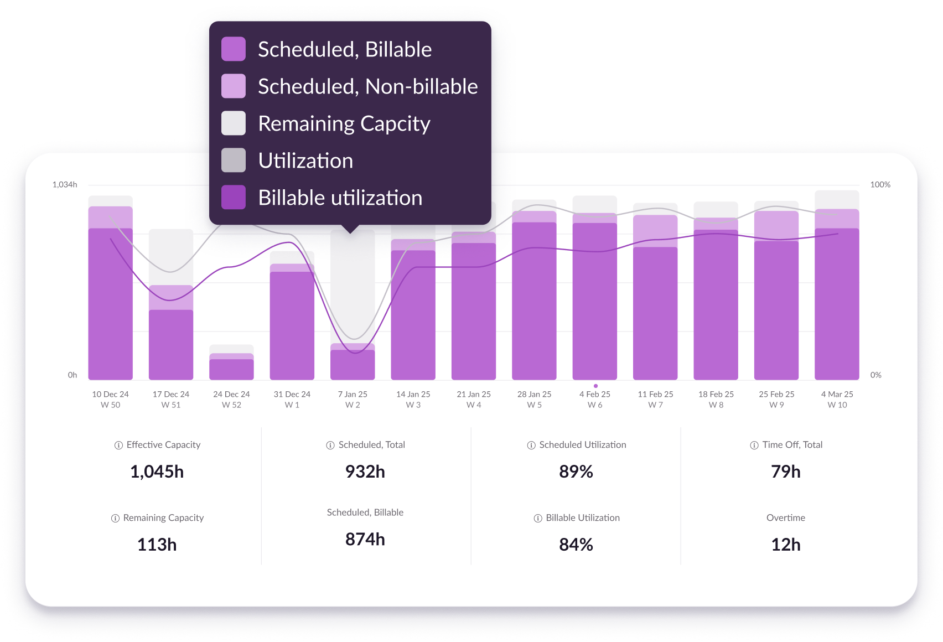
Feature spotlight:
Utilization and capacity report
Easily understand upcoming capacity and dig into historical utilization to evaluate where billable time was lost, or went unoptimized.
“Flexible adjustments to resource utilization are possible without great effort. The tool is also very clear and the consultants can see at a glance which projects they are scheduled for.”
— Verified review on G2.
How to do resource forecasting in Jira
One more definition, for good measure:
Resource forecasting uses the data and learnings from the above steps to more effectively predict and scope out future resource needs including availability and capacity for future projects and the business in general. This is where the cycle begins again, as resource forecasting directly influences the resource planning stage.
Jira resource forecasting using built-in features
Jira gives you decent visibility into work that’s ready to be assigned, and of what’s in the pipeline and already set up with start and end dates. However, Jira could benefit from more detailed reporting that helps you plan for the future.
Jira resource forecasting: What you can do on the platform
- You can use the Jira timeline view to see upcoming work you’ve already planned for the future, you can informally use that to get some idea of what similar future projects will look like
Jira resource forecasting: What you can’t do on the platform
- Reporting in Jira doesn’t give you the historical resource utilization you need to make informed decisions about resource forecasting
“When we used Jira, forecasting was a nightmare because we really couldn’t see workloads for hours/weeks/months ahead.”
— Derek Bruce, Director of Operations at SMSTS Course

Resource forecasting using Jira integrated with Resource Guru
- Our reporting suite shines here too. Not only are the reports fully customizable, you also get out-of-the-box reports with clear data visualization to help you understand data more easily and use it to forecast more effectively
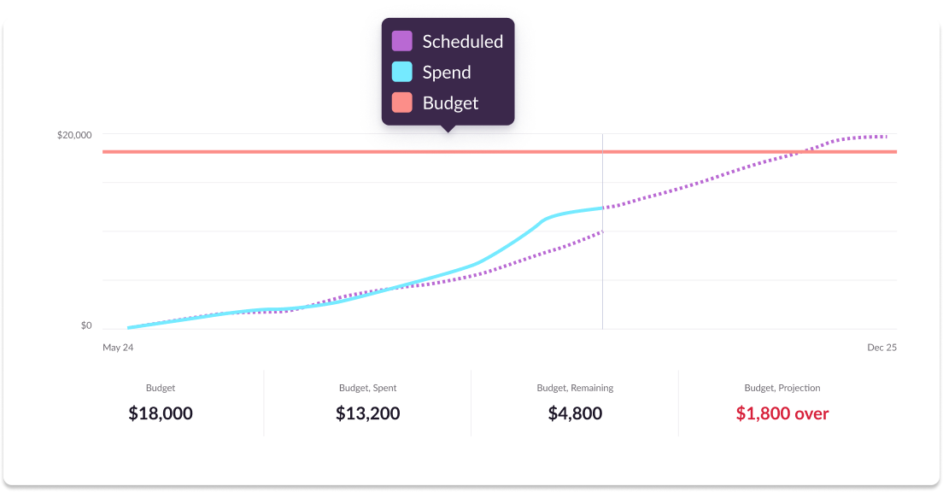
Feature spotlight:
Individual project report
Monitor and forecast spend on projects—both in terms of time and money spent—to understand how each project is tracking against its assigned budget.
“The reports it generates helps us so much with forecasting and quoting for future work, couldn’t do without this feature now.”
— Verified review on G2.
I’ve covered a lot in the last few sections, but there are a few final questions worth addressing when it comes to Jira resource management.
Frequently asked questions about Jira resource management
What is the best way to do resource management in Jira?
Since Jira wasn’t designed specifically with resource management in mind, the best way to do resource management in Jira is to integrate it with a purpose-built system like Resource Guru.
What are the benefits of using Resource Guru with Jira?
Overall, Resource Guru is a more comprehensive piece of software for resource management where you can complete every stage of the process in a single tool.
By integrating Jira with Resource Guru, you can assign work while taking individual capacity into account, schedule based on real-time, custom availability, and report effectively on budget burn, both in terms of time and money.
How do I start using the Resource Guru integration with Jira?
Once you have both a Resource Guru account and a Jira account, you can connect the two systems by navigating to Settings -> Integrations in Resource Guru.
You can get full instructions in our Help Center. Integrations are available on all Resource Guru plans.
Which teams benefit most from using Jira and Resource Guru together?
As I touched on at the start of this article, Jira has evolved from just being for technical teams.
Generally though, as well as teams who build software, the industries that would benefit most from the Jira x Resource Guru integration include agencies, engineering, consultants, construction, and professional services.
The best way to approach resource management with Jira
Jira is a powerful platform for managing work but, when it comes to managing resources, it wasn’t built to go the distance on its own. From capacity and forecasting to utilization and scheduling, resource management is a multi-layered process that needs deeper visibility and richer functionality than Jira offers out of the box.
By combining Jira with a purpose-built solution like Resource Guru, you can transform fragmented workflows into a streamlined system—one where availability, skills, budgets, and timelines come together. That means more clarity, better decisions, and smoother delivery.
If you’re ready to unlock Jira’s full potential and elevate your resource management workflows, take the next step and explore how our native Jira integration works in action. Or, if you’re ready to transition fully to a dedicated resource management platform with purpose-built features for every stage, take out a free trial of Resource Guru.

The #1 scheduling tool trusted by thousands of project teams
Join thousands of project managers who have made scheduling a breeze.
A quick note on the details
While I’ve made every effort to ensure the accuracy of available functionality mentioned in this article, software evolves pretty fast. I may have missed newer or more hard-to-find features on Jira. If you do spot any inaccuracies, you can forward them to me using the email address in my author bio below.