

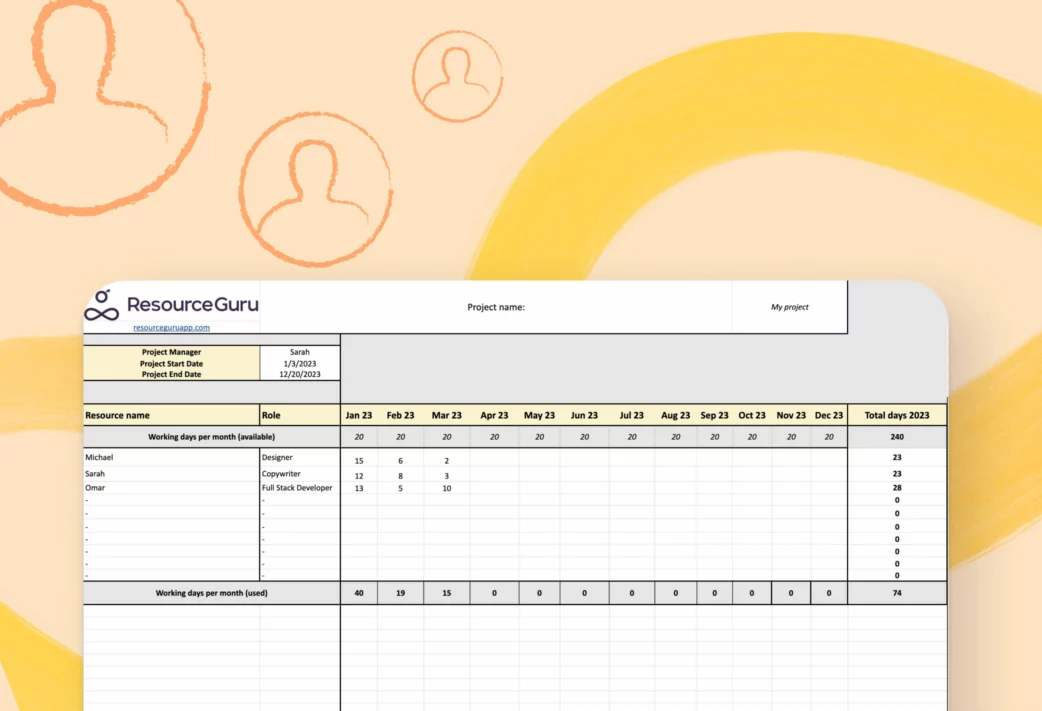
A capacity planning template helps teams understand how much work they can realistically take on, based on available people, time, and skills. Instead of guessing who has bandwidth, you can use a template to map workload against actual hours, upcoming projects, and team availability.
Many teams refer to this as a “resource capacity planning template,” since the goal is to track how team resources are allocated across projects and identify gaps before they cause delays or burnout.
Download our free template to plan resources for future projects, track your team’s workload, identify overallocated people and resources, and keep projects on track.
Get Your Free Capacity Planning Template
Later in this article, we’ll also show you how to build your own capacity planning template in Excel from scratch.
In this article 📖
What’s a capacity planning template?
A capacity planning template is a pre-designed document that helps you estimate whether you have enough capacity to meet demand. Depending on the context, that can mean the capacity people, time, or equipment have, or operational capacity.
What’s a resource capacity planning template?
A resource capacity planning template focuses specifically on people and teams. It helps you compare available time and skills against planned work. With that, you can prevent burnout, and spot gaps, overload, and underutilization before projects slip.
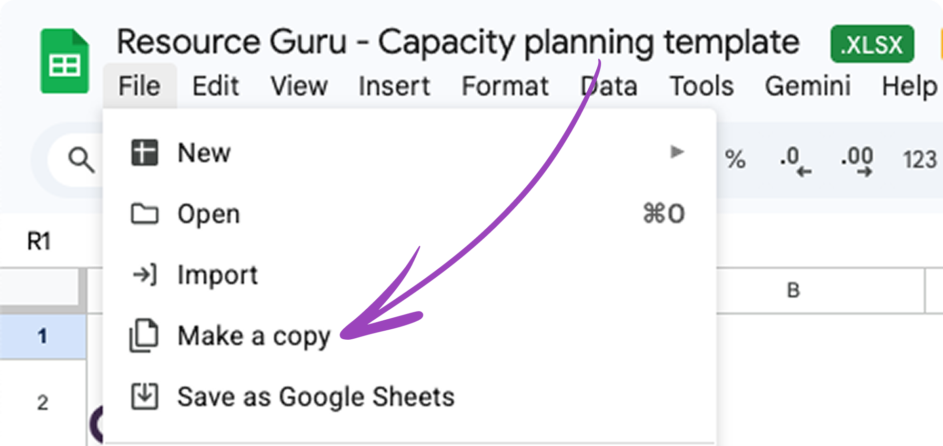
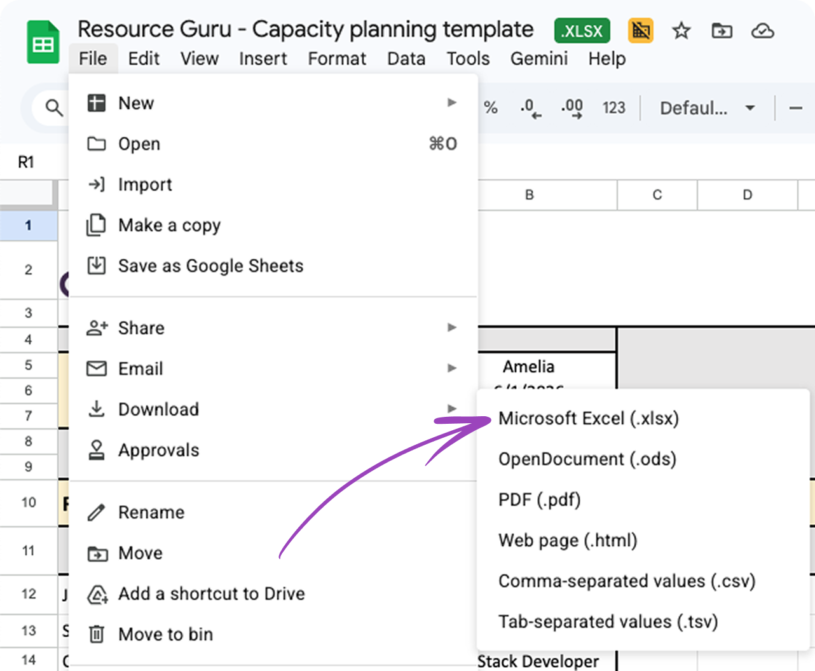
Note: In this article, we use the phrases “resource capacity planning” and “capacity planning” interchangeably and is built for team and project capacity. This free capacity planning template for Excel gives you instant visibility into team capacity. Designed for project and resource managers across industries, including agencies, consultancies, construction, and IT. The template works in Excel and Google Sheets. Download Your Capacity Planning Template Available as a free XLSX download for Excel, or use it straight away in Google Sheets for faster collaboration. This resource capacity planning spreadsheet includes: Best for: Small teams, early-stage planning, and monthly capacity checks. Less suitable for: Teams needing real-time updates, automated utilization warnings, or percentage-based capacity tracking (for that, consider our capacity planning software). Here are the must-have features to look out for in resource capacity planning templates and software. Save hours adding up your totals manually with automated calculations. Must-have automatic calculations for resource capacity templates include the total days used in a month and year. Ideally, these calculations should be available for individuals and all resources combined. You can add calendar integrations to your resource capacity planning spreadsheet through Excel or Google Sheets, but capacity planning software with built-in calendar integrations makes it faster to set up, easier to maintain, and less prone to human error. With dedicated software, you can instantly see whether your resources are available, unavailable, or over- or under-capacity. You’ll also avoid painful double bookings because everyone’s calendar is available in a single view. Plus, you can store your project data in one place rather than across multiple spreadsheets and files, meaning data is easier to locate and stored more securely. Overloading your team can cause burnout, delays, and low-quality deliverables. You should reserve capacity for unexpected bumps by keeping resources at a 70-80% utilization rate throughout the project timeline. Use conditional formatting in your template to highlight resources nearing 70-80% or upgrade to automated software. At Resource Guru, we offer automatic capacity calculations for easy planning and resource utilization optimization. Key takeaway: Holding back 20% of team capacity accounts for sick days, meetings, and admin time while preventing resource overallocation and the burnout that can follow. “The main problem is rarely people—it’s the lack of a realistic demand forecast and the illusion of full capacity. When sales provide optimistic estimates and delivery is planned ‘on the spur of the moment,’ any delay in deadlines turns into a chain of bottlenecks. We realized that without a single source of truth about team capacity and scenario planning (best/realistic/worst case), agencies inevitably live in firefighting mode.” — Paklo Tkhir, CTO, Euristiq Whether you excel in Excel or you’re a Google Sheets genie, here’s a quick guide to how to use your free resource capacity planning template. Note: You’ll have to be logged into your Google account to make a copy of this document or request access. Note: These automated totals work in Excel and Google Sheets Sure, setting up resource capacity planning templates in Excel is a handy starting point. But, you’ll save even more time if you combine templates with resource capacity planning tools that have automated features. Automated warnings, for example, will let you know in real-time when your resources are over- or under-booked. That saves you hours of painstaking manual calculations and spreadsheet customization, or micromanaging your team regarding their availability. Access your free Resource Guru trial and see how we save you time by automating your processes. If you’d rather build a capacity planning template from scratch, here’s a straightforward approach that’ll get you up and running. The process takes about 30-60 minutes, depending on how much customization you need. Start by creating your column headers. You’ll want to include: This gives you everything you need to track both capacity and spending in one view. Manual math is where errors can creep in, so build some formulas that do the work for you: These formulas will update automatically when you adjust allocations, so you always have current numbers. Conditional formatting turns your template into an early warning system. Set cells to change color when utilization crosses thresholds—amber or red when someone hits 80-85% capacity, and a different color for underutilized resources sitting below 60%. This visualization makes overallocation obvious at a glance. Include a header row that shows total team capacity per period. This gives you a sense of whether you have enough bandwidth across the whole team before you drill down into individual allocations. Pick a rhythm and stick to it. Weekly updates work well for fast-moving teams, monthly for more predictable workloads, or per sprint if you’re running agile. Consistency matters more than frequency. A template that’s updated reliably every two weeks beats one that’s supposed to be daily but falls behind. Our free capacity planning Excel template already includes the core structure and automated totals, and you can add utilization and formatting using the steps above. Download it now and start planning. Once your template is set up, the real value is better workload visibility, faster resource allocation decisions, and fewer last-minute reshuffles. A capacity planning template can save you time and headaches by streamlining your processes. Here’s how: A template gives you a bird’s eye view of team capacity per individual resource. The data helps you assess over- and under-utilized team members, so you can match resources to project requirements and create a workload plan that supports project success and improves team performance. Use case: A last-minute task requires your full stack developer, but your template shows they’re at capacity. You rearrange team workload based on specialisms and who has available days, freeing up the right expertise when it’s needed—with minimal friction. A free resource capacity planner Excel template provides a basic guide if you’re new to project or resource management. Think of it like keeping the bumpers up when you go bowling. Your template will help you stay in the lane as you find your footing. Warning: Templates lose efficiency as a project scales, mainly because the manual data entry becomes too time-consuming. In these cases, an all-in-one capacity planning tool will help you stay efficient at scale. Clear visibility into working hours available versus used helps you make data-driven decisions about project resource allocation and prevent overcommitting team members. Note: These benefits hold up best when your team is small and your plan is relatively stable. Once you’re coordinating multiple projects, tracking time off, and regularly rebalancing work, spreadsheets start to create extra admin instead of reducing it. While capacity planning templates and spreadsheets work well for smaller teams or straightforward projects, teams managing multiple projects with shifting priorities need more robust solutions. “The most common mistake is treating capacity planning as a spreadsheet exercise instead of an operating discipline. Teams track hours but ignore decision load, rework, and interruptions. Another mistake is designing capacity plans that only leadership understands. If teams can’t see how their work maps to capacity assumptions, the plan won’t hold under pressure.” — Denisse Calderon-Trevizo, Fractional COO/Consultant Resource Guru’s capacity planning software offers real-time visibility, automated capacity warnings, drag-and-drop scheduling, and resource utilization reports—all designed to prevent overallocation and support project success. “Before Resource Guru, we did all our scheduling through Excel spreadsheets, which was a pain. One person had to accumulate the information, put it in the spreadsheet, and share it with multiple people. Resource Guru is available in real time—any changes can be seen instantly by multiple users. It has saved us multiple hours daily and made scheduling much more efficient.“ — Resource Guru Customer, Professional Services Associate Frequently asked questions about capacity planning templates. A resource capacity template is usually a pre-built spreadsheet for Excel or Google Sheets to plan capacity and adjust as projects evolve. It should include automated functions for calculating totals across time periods. This is a great temporary solution if you don’t have a resource management tool in place. You can use a resource capacity plan template if you’re a newer project or resource manager. Because templates don’t work as well at scale, we recommend them for smaller projects. For teams managing multiple projects or complex workflows, capacity planning software is essential. Capacity planning templates may differ by format—a Google Sheet, an Excel spreadsheet, or sometimes a Word document. Different templates also serve specific departments or preferred project management styles (like Agile). You can find templates for various types of resource planning, including workforce, product, or tool capacity. A resource capacity planning template provides a bird’s eye view of team availability and utilization. In contrast, a resource scheduling template helps you assign tasks based on resource capacity across a working week or month. Both work well together—use the capacity template to confirm bandwidth, then the scheduling template to assign specific work. Start by measuring available capacity, then forecast demand, compare supply against demand, adjust allocations or timelines, and review the plan regularly as work changes. For a fuller walkthrough, check our capacity planning guide. More free resource planning templates If you’re building out your planning toolkit, these templates work well alongside a resource capacity planning template. We love templates. They’re great for small-scale, short-term projects. But once you’re coordinating multiple projects, or your plans change frequently, spreadsheets can be hard to maintain and easy to misread. Resource Guru research shows 44% of respondents use no resource scheduling software, and among those who do, Google Sheets is the most common tool at 28%. The same pattern shows up in time tracking: 46% do not use timesheet software, while Google Sheets is again the most widely used option among teams that do at 23%. “When we were looking to move multiple teams off spreadsheets and into 1 planning system, we found Resource Guru. We like the flexibility and visibility in the tool. You can see at-a-glance availability, and you can use filters to see your own team or all resources.” That matters because poor visibility has real consequences: increased burnout, more time taken off work, and lower-quality work. Resource Guru’s capacity planning software gives you real-time visibility into availability and utilization so you can sidestep all of these problems while making staffing decisions faster and reducing overbooking risk. What you get in practice: Unlike templates, Resource Guru adapts with your team as things change, so you spend less time maintaining a spreadsheet and more time keeping projects on track. Plan using real availability (not best-case assumptions) using our resource capacity planning software.Resource capacity planning template for Excel: Free download
What’s inside the template
Resource capacity plan template: Must-have features
Automated totals
Calendar integrations
Automated capacity calculations with warnings
Real-life experience 🌎
How to use your resource capacity template in 7 easy steps
1. Click the link to your free resource capacity planning Excel template
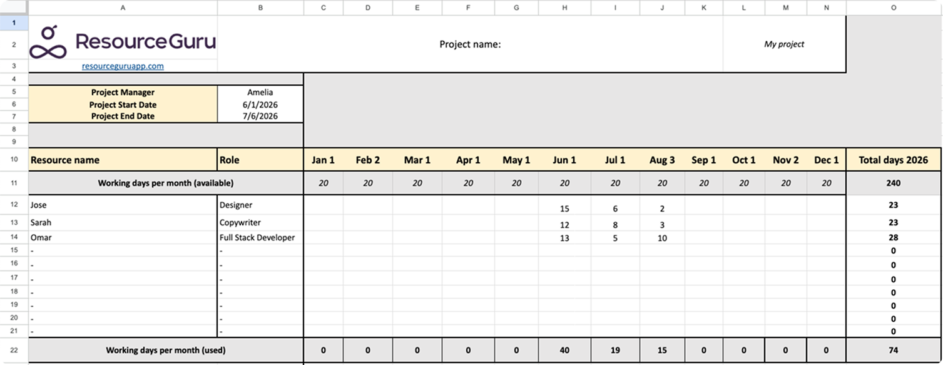
2. If you’d like to use your template in Google Sheets
3. If you’d like to use a resource capacity planning template in Excel
4. Whether you’re using Excel or Google Sheets
5. Add your data to the resource capacity planner template
6. Customize the template
7. Automate your resource capacity planning templates
How to build your own capacity planning template in Excel
Set up your structure
Add formulas for automated calculations
Apply conditional formatting to flag issues early
Add a “working days available” row
Decide on your update frequency
The benefits of using an Excel capacity planning template
Improve workload planning
A roadmap for newer resource or project managers
Support informed decisions about resource availability
Why Resource Guru beats templates for complex needs
Resource capacity planning template: FAQs
What is a resource capacity template?
When should you use a resource capacity template?
Are there different types of capacity planning templates?
What’s the difference between a resource capacity template and a resource scheduling template?
What are the steps of capacity planning?
Discover more advanced resource capacity features with Resource Guru


Ready to switch from spreadsheets?