



Resource capacity planning is about one question: can your team actually deliver what’s in the pipeline, or are you already overbooked? With 84% of desk workers in the UK doing overtime, the margin for overload is razor-thin.
In this guide, I’ll show you how to forecast demand, spot capacity gaps, and build a resource capacity plan that protects both project delivery and your team.
In this article 📖
What is resource capacity planning?
Resource capacity planning definition
Resource capacity planning compares what your current team or department can actually do (their capacity, skills, and working hours) with what you need them to do (the projects in your pipeline and BAU work). This resource capacity planning process is important so you can make realistic plans and delivery commitments.
Other definitions
There are a number of closely connected terms that sit under the umbrella of “capacity planning.” Here’s what each actually covers:
Term | Definition | Questions it answers |
Capacity planning | A longer-term, strategic process that determines the overall capacity an organization needs to meet future demand and goals. | “Can we take on new clients this year?” “Do we need to hire, reassign, or scale up?” |
Resource capacity planning | Zooms in to determine whether particular departments or teams have enough resources (e.g. people or equipment), available time, and suitable skills to complete projects in your pipeline, and meet workload demands. | “Can this team deliver our upcoming workload?” “What departments are over or under capacity, and what changes will fix it?” |
Project resource capacity planning | Also known as project management resource capacity planning. Follows the same principles as general resource capacity planning, but is specifically on a project level (likely done by PMs across different teams/projects). | “Do we have the skillset on the current project team, to deliver this new project for our client?” “Will we be able to meet this project’s milestones with the current capacity?” |
Resource planning | Identifying what resources are needed for your plans, either on a task, project, or wider business level. | "What resources do we need for this project?" "Do we need specialists or specific equipment?” |
Capacity management | Continuous monitoring and optimization of capacity across the organization to maintain stability and efficiency. | “How do we keep workloads balanced over time?” “Can operations run smoothly based on current available capacity?” |
Further reading: Visit our glossary for more definitions.
It’s worth noting that some of these terms can be used interchangeably. However, in this guide, we will refer to resource capacity planning specifically, with a focus primarily on people’s capacity, closely tied to delivering projects. This is one of the most common challenges for agencies, consultancies, and project-based teams.
Benefits of resource capacity planning
When you know exactly what your team can take on and what they can’t, you can start planning with confidence.
Here’s what a good resource capacity plan gets you:
- Projects that actually land on time ➡️ You get a clear picture of what’s realistic, so you stop setting optimistic timelines that quietly slip. Instead, you only commit to what your team can truly deliver, keeping everyone from your bosses to your clients happy
- More sustainable resource utilization ➡️ Working at 100% capacity sounds efficient, but it leaves no margin for error. Building in breathing room means you’re not scrambling when someone gets sick, priorities shift, or unexpected work lands
- Being able to prevent burnout before it starts ➡️ Burnout can be caused by a lack of resources and a team that’s over-capacity. Resource capacity planning helps you rebalance early, before crashing out becomes the only option
- Fewer last-minute scrambles for people or skills ➡️ Comparing demand with team capacity early helps you spot resource shortages before they become emergencies. Whether you need a contractor, extra training, or a simple reshuffle, you can act ahead of time
- Better decisions about hiring and contracting ➡️ With visibility into your team’s upcoming workload, you’ll know whether you genuinely need more people, or if the real fix is moving a deadline or rebalancing work
- Teams that feel protected, not stretched ➡️ Balanced workloads mean people aren’t firefighting every week. They’re less stressed, and they know what they’re responsible for. That gives them time to do work properly, and ultimately they get more done. Creating a positive environment shows up in every project that leaves your door
“Resource Guru has significantly improved our visibility, boosting project ownership and forecasting ability.”


The cost of poor resource capacity planning
On the flip side, if you don’t ensure that your people have spare capacity to handle projects and deal with ad-hoc issues, you’re creating a situation where every new piece of work either pushes something else off schedule or forces someone to work late.
Without proper resource capacity planning, you’re risking more than just productivity problems—you’re putting retention at risk too. When teams lack visibility into capacity, the default becomes saying yes to everything until something (or someone) breaks. Our overworking research shows:
- Over a quarter (26%) of desk workers feel uncomfortable saying no to additional work, even when already at capacity
- 28% have experienced burnout with 53% of those burned out citing workload that’s too high, 33% pointing to unrealistic deadlines, and 25% blaming under-resourced teams or being over-allocated
- Nearly 1 in 5 (18%) would quit due to under-resourced teams
It’s clear that poor capacity planning can be damaging for morale and retention, but also has a real business impact:
“In my nine years consulting for startups, I have seen that flawed resource capacity planning is the primary source of operational drag and missed financial targets.”
– Jon Morgan, Co-Founder, Venture Smarter
Further reading: For tips on what to watch out for, take a look at our guide to the factors affecting resource capacity planning.
How to do resource capacity planning (step by step)
Now that you know why it’s important to conduct resource capacity planning, I’ll show you how to actually do it.
A simple, repeatable resource capacity planning process will show you how to plan resource capacity in a way that actually sticks. In the steps below I’ll go a little broader (for example, I’ll touch on forecasting and monitoring too). This will provide more context and help you implement it faster.
1. Choose your resource capacity planning strategy (and risk level)
Before you plan resource capacity, decide how aggressive or cautious you want to be. Are you playing it safe, or getting ahead of demand?
Here are the four most common resource capacity planning strategies:
Lead: Acquire resources ahead of confirmed demand
- Pros: When demand is predictable, and you’re aiming for growth, securing new people and equipment early protects delivery and keeps projects moving
- Cons: You’ll carry extra costs if work comes in slower than expected
“When pipeline visibility is unclear, focus on leading indicators such as sales conversations and proposal volume rather than waiting for signed contracts. This approach allowed Legiit to staff ahead of demand without overcommitting resources.”
— Chris M. Walker, Founder and CEO, Legiit
Lag: Acquire resources only when demand is confirmed
- Pros: Good for cost‑conscious, risk‑averse teams because you avoid paying for people or equipment before the work is locked in
- Cons: You’re also more likely to hit resource shortages and delays when work lands faster than you can hire, contract, or source what you need
Match: Acquire resources gradually as demand rises
- Pros: A balanced default for most project‑based teams. You scale up in step with confirmed work
- Cons: Only works if you’ve got decent resource forecasting and clear project priorities guiding the way
Dynamic: Continuously tweak resources based on live forecasts
- Pros: The flexible option for volatile pipelines and juggling multiple projects at once
- Cons: You’ll need good utilization data and views, and the discipline to keep adjusting as things shift
Whichever strategy you choose will influence how you measure capacity in step 3 and how frequently you review your plan in step seven.
2. Select your resource capacity planning software
Here are two routes I’d recommend, depending on your needs:
Use a capacity planning spreadsheet
You can get started by running this in spreadsheets if you have simple resource capacity planning needs.
We’ve even built you a free template here.
However, spreadsheet-based planning has a habit of collapsing under its own weight. You start with good intentions, but once you’re juggling multiple projects, time zones, and everyone’s PTO, maintaining a formula-heavy monster can become a full-time job in itself.
Adopt a dedicated resource capacity planning tool
A purpose-built resource capacity planning tool might make a lot more sense.
This will give you a single, reliable source of truth for bookings, time off, and project demand. Once you know who’s doing what (and when) you can safely take on new work with confidence, and keep workloads balanced for your team.
That’s exactly what Resource Guru’s capacity planning software is built for. Here are some key features to help you plan capacity:
- Availability bars and heatmaps so you can scan who’s got capacity and who’s swamped
- Clear availability and leave management, so part-time schedules, vacations, sick days, and time zones are reflected in your plan
- Resource placeholders and tentative bookings to map out future work before it’s fully confirmed
- Clash management plus a waiting list, to prevent burnout from capacity and allocation issues
- Utilization reports and tracking, including the split between billable and non-billable work, so you can keep workloads sustainable
- Approval workflows for in-demand people and resources, so high-priority work gets first call on scarce capacity
- Custom fields, filters, sorting, and grouping so you can tailor views to how your team plans and reports
- Timesheets information, so you’re using actual data (rather than estimated data) to feed into capacity plans

Ready to move beyond spreadsheets?
Plan using real availability (not best-case assumptions) using our resource capacity planning software.
3. Measure current resource capacity (and, yes, that includes meetings and admin)
Now, you need a realistic view of the time and skills your team actually has available for specific types of work. That includes everyone doing the work: full-time employees, part-timers, contractors, and freelancers.
You can do this by:
- Calculating standard hours 👉 For example, 8 hours × 5 days = 40 hours per week
- Adjusting for real availability 👉 Use inputs like calendars, HR systems, and PTO records to subtract holidays, planned leave, and part‑time schedules
- Accounting for non‑project time 👉 Admin, BAU, internal meetings, training, hiring, and support all eat into capacity. Make sure to account for this
4. Forecast resource demand (pipeline + BAU + support)
Next, look at what’s actually coming down the pipeline, from places like your resource management or project management tools.
For each project, you can then more accurately estimate:
- Total hours required by role or skill
- When those hours will land (by week, sprint, or month)
With this insight, you’re able to build an accurate picture of demand across your resource pool. There’s no single perfect way to forecast demand, though. Start with the best inputs you have, then use the best practices section below for more ways to sense-check capacity vs. demand.
5. Compare resource capacity vs. demand (and find the gaps)
You’ll need to put capacity and demand side by side. Do the numbers work, or are you short?
For each project role or team, you want to work out the following:
- The total capacity per chosen timeframe
- The total demand for the same period
- Demand – capacity
A positive number means you’re over capacity. Time to find more resources or shift timelines.
A negative number means you’ve got spare capacity. This is good news, and it’s always good to have a buffer. But, if the gap is too wide, it might indicate inefficiencies, or you might need to re-allocate resources.
If it’s close to zero, you’re probably fine, but keep a close watch on those utilization rates. The ultimate goal is to allocate resources so project demands are covered without pushing team capacity into the red.
What you’re looking to gain from doing this is:
- A simple gap report
- An understanding of utilization
- A shortlist of any flagged risks
To help bring this to life a bit, here’s a resource capacity planning example:
- A creative agency has 5 designers for an upcoming branding project
- Each designer has 30h/week of project capacity (after meetings and admin, and accounting for ideal utilization rates)
- 5 x 30 hours = 150h/week in total capacity
- Their combined project pipeline peaks at 210h/week in weeks 5–7. They’re 60h/week short
6. Act to close gaps
Once you can see where your capacity issues are, you can decide how to fix them.
If you’re short on capacity:
- Adjust the project timeline, or trim scope where it won’t hurt outcomes
- Double check you’ve not succumbed to scope creep
- Temporarily pause or move lower‑priority/non-project work
- Re-allocate some tasks to another team or location
- Bring in freelancers/contractors (or new hires if needed)
If you’ve got capacity to spare:
- Pull forward future projects or tasks
- Pitch for additional work (upselling for existing clients/projects)
- Pitch for new clients/projects
- Invest in training, process improvements, or internal initiatives
- Re-allocate resources to other projects that might be short on capacity
If you’ve carried out this exercise a few times and there are consistent capacity gaps, you may want to reevaluate your overall team structure and size.
7. Set a cadence for reviewing resource capacity
This shouldn’t be a one-and-done exercise. It works best when you check in regularly.
How regularly you decide to review might be dictated by your chosen strategy. For example, a dynamic strategy could mean you need to review frequently so you can adjust quickly, but a lead strategy might need less frequent checks.
And, you might want lighter weekly checks, with more in-depth monthly or quarterly reviews.
Once you’ve decided your cadence, you’ll want to put together a meeting schedule that may include:
- Running through any new or upcoming PTO
- Reviewing an updated CRM/sales pipeline
- Any changes within your project management/resource management tool
- Possible utilization changes
- Hiring updates
- Deciding on any trade-offs that may need to be made
- Resolving any clashes
- Assessing the burnout risk for your team
- Checking to see whether your resource capacity planning strategy still fits your portfolio of projects and future demand
Run this cadence from a single, shared view of the plan. If your organization is smaller or has fewer moving parts, a well‑maintained resource capacity planning spreadsheet can do the trick. For anything bigger or more complex, a tool like Resource Guru will keep your resource capacity planning process accurate without the admin becoming a full‑time job.
Regardless of your approach, treat resource capacity management as an ongoing process. Make sure to review utilization and forecasts regularly, update assumptions as you learn, and adjust the plan as your mix of work evolves. A “living” plan will always beat a beautiful one that’s three months out of date.
Handy resource capacity formulas to use
Here’s a quick formula cheat sheet I’ve put together, to help you calculate resource capacity:
Formula for standard hours (per person)
This is to work out standard hours (also known as baseline capacity).
Baseline weekly capacity in hours (per person): Full time working hours/day × Working days/week
Example: 8 × 5 = 40 hours
Remember, these baseline hours are a starting point, not someone’s true capacity for project delivery.
Formula for weekly project capacity in hours (per person)
To estimate usable capacity, subtract the time they can’t spend on project work, like:
- Non-project time such as internal meetings, admin, training, and BAU support
- Planned time off like PTO, holidays, and part-time schedules
Weekly project capacity in hours (per person): Baseline hours/week – non-project hours/week
Example: 40 baseline hours – 5 hours of meetings – 3 hours admin – 4 hours BAU = 28 hours
Formula for demand vs. capacity gap
For this formula, you are looking for any gaps. So take the total demand for the chosen timeframe, and subtract the total capacity for the same period.
Capacity vs. demand gap (per person): Total demand – total project capacity/available hours
Example: 32 hours needed for a project – 28 available hours = 4 hours shortfall
Formula to calculate FTE requirements
Use this to understand how many full-time employees you need to execute a project.
FTE needed for project: Total demand ÷ total project capacity/available hours
Example: 32 hours needed ÷ 28 available hours = 1.1 FTE (you need one full‑timer plus some extra help)
7 best practices for effective resource capacity planning
Good planning comes down to keeping your resource capacity plan connected to reality as projects, people, and priorities shift.
These seven practices keep your plan grounded in the day-to-day:
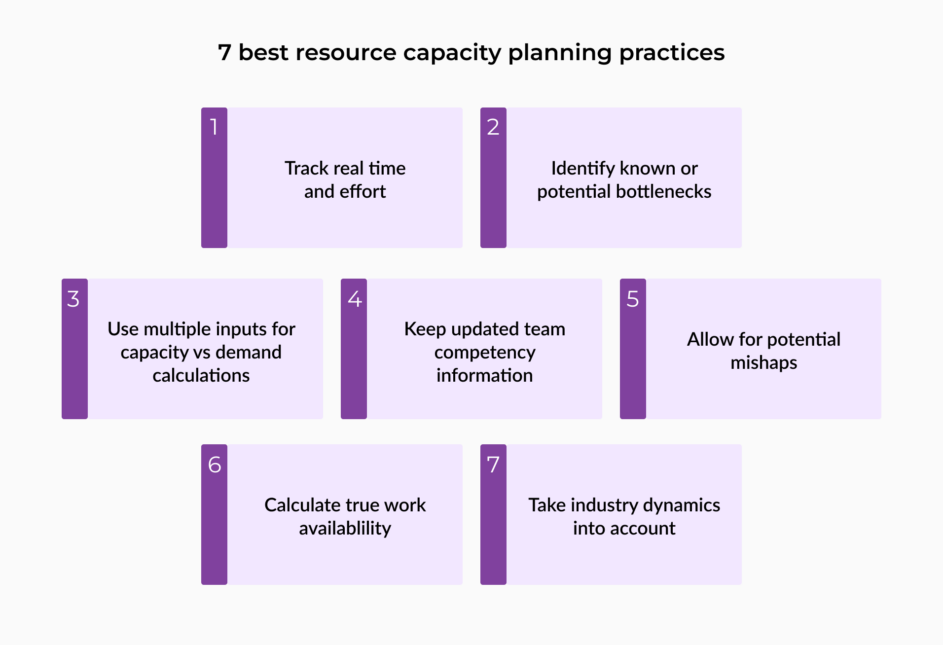
1. Track real time and effort
Your resource capacity planning forecasts are only as good as the data feeding them. If you assume a task takes two hours but it consistently takes three, the hours you schedule for future work will always be off.
Use timesheets or effort tracking (where you record time spent on each task) on key projects to see how long work actually takes by role or skill. Over time, this gives you a solid baseline for estimating similar tasks and future projects, instead of planning on guesswork and optimism.
If you’re using Resource Guru, you can compare actual hours reported in timesheet entries directly with forecast entries in your Schedule. It’s a quick way to compare forecasted hours with actuals, and sharpen your estimates over time.
Further reading: Read our project time tracking guide here if you need pointing in the right direction.
2. Identify known or potential bottlenecks
Bottlenecks show up in different forms: that one specialist everyone needs, a shared role stretched across teams, or critical tools that multiple projects depend on.
Look for people or resources that appear in lots of project plans at once. If each team builds its own plan in isolation, those shared resources quickly become overloaded. A central intake for new work and a single view of bookings across teams make it much easier to spot bottlenecks early and adjust resource allocations before they turn into delays.
A shared schedule in a resource capacity planning tool like Resource Guru makes it much easier to see who’s booked on which projects, and where people are at risk of being double-booked or overloaded. Bookings that don’t fit someone’s availability can be added to the Waiting List, giving you a clear queue of work that needs more capacity or a different home before it turns into a crisis.
3. Use multiple inputs for your capacity vs. demand calculation
Don’t rely on just one source. Pull your resource capacity data together from multiple places:
- Your chosen resource capacity or project planning tool: get hold of any confirmed projects, tasks, milestones, and project requirements
- Your CRM/sales pipeline: likely future projects and their probable start dates
- Support/BAU: ongoing support queues or service commitments
- Historic timesheet entries: how effort is usually split between projects, BAU, and support, and how long repeated tasks actually take to complete
Simple forecasting methods are usually enough. Pick a forecasting method that fits the shape of your work:
- Time series forecasting: Estimate future demand from historical patterns collected over time. Use when work is recurring or seasonal (e.g., monthly retainers, peak periods)
- Regression forecasting: Take past data to find a mathematical relationship, then use that relationship to predict future outcomes. This can be used when demand closely tracks another factor, such as the number of active clients or product users
- Scenario planning: Use when the pipeline is uncertain. Build “likely”, “best case”, and “worst case” scenarios and stress-test how robust your resource capacity plan is
- Delphi method: Use when the data is thin. Ask a panel of experts for estimates, then iterate until you reach a sensible consensus
4. Keep updated team competency information
Planning purely by job title hides a lot of risk. For example, two “senior developers” might have completely different strengths or experience.
Maintain a lightweight competency or skills matrix showing who can do what, and at what level. This helps you allocate resources more intelligently, avoid overloading your few “unicorns,” and see where you’ll need training, hiring, or contracting support to cover upcoming work.
If you’re using Resource Guru, you can capture and maintain this context using custom fields like skill set, seniority, certification, or team, so it’s visible when scheduling, and easier to filter and report on later.
5. Allow for potential mishaps
Planning to 100% capacity looks efficient until someone gets sick, a meeting runs over, or priorities shift. Then your entire plan collapses.
Aim for 70–80% productive utilization on project work, and keep the remaining 20–30% as a buffer for BAU, recovery time, and inevitable disruptions. Building in slack is not wasted capacity—it’s what keeps deadlines realistic, gives teams a valuable sense of psychological safety, prevents burnout, and ultimately keeps the business productive.
6. Calculate true work availability
This one follows on nicely from the last. A 40-hour contract doesn’t mean 40 hours of project work. To calculate resource capacity, start with contracted hours, then subtract vacation, planned leave, recurring meetings, admin, support work, and other BAU commitments.
What’s left is the capacity you can safely commit to projects. If you plan on using the full 40 hours, you’re effectively overbooking your team before you even start.
Use our billable hours calculator to track hours spent on tasks and activities that you can charge for
7. Take industry dynamics into account
Resource capacity planning looks different depending on your sector, company dynamics, and department. For example:
- Product teams may rely more on roadmaps and historical patterns
- Support‑heavy environments may need to factor in SLAs and spikes
- IT teams often need to balance planned project work against unpredictable incident response, maintenance windows, and on-call rotations, which could mean building in more buffer capacity than other teams
- Agencies and consultancies might lean heavily on pipeline‑based forecasting
Resource capacity planning FAQs
What is resource capacity in project management?
Resource capacity in project management follows a similar approach to general resource capacity planning, but with a focus on project-based work specifically. It will usually be carried out by project managers across different teams and projects.
In order to successfully execute a project, you need to check if your project team has enough resources (such as people and equipment) to meet the demands of the project.
Understanding project resource capacity helps project managers to:
- Assess available hours, skills, and resource constraints
- Set realistic project timelines and budgets based on actual availability
- Avoid resource overallocation and burnout by preventing hidden overload
- Optimize resource allocation by matching tasks to the right skills
- Make smarter decisions about hiring, reprioritizing, or rescheduling project work
How often should you update a resource capacity plan?
How often you should update a resource capacity plan will vary based on different strategies, companies, and needs. However, for most teams, a weekly catch up would be ideal to capture new projects, PTO, and shifting priorities. On top of that, run a deeper monthly or quarterly review to revisit assumptions, re-check forecasts, and adjust your overall strategy.
What are the key questions to ask when resource capacity planning?
The key questions to ask when resource capacity planning come back to three basics:
- How much resource will demand require? (Hours/FTE by role or skill)
- How much resource is currently available? (True capacity after BAU, meetings, and PTO)
- What actions are needed to close the gap? (Hire, reschedule, reallocate, or reduce scope)
What is a good resource capacity buffer?
A good resource capacity buffer is the portion of capacity you intentionally leave unallocated so you can absorb unplanned work without overloading people. A commonly referenced industry benchmark is 80%, with many project teams planning for 70–80% target utilization on planned work, keeping 20–30% as a buffer for unplanned tasks, delays, and changes in scope.
Utilization rates above 80% may be difficult to sustain long term due to burnout risk, which is why many teams plan below full allocation.
Resource capacity planning = clarity, predictability, healthier teams
When resource capacity planning works, you’ll know what’s coming, who’s handling it, and where the pressure points are before they become crises.
Resource capacity planning trusted by thousands of project teams
Plan your team’s time, fine-tune your forecasting, and boost billable hours.