


Founded in 2011, Phases is a software agency developing websites, custom integrations, and mobile apps. We caught up with three members of the team to hear how Resource Guru empowers them to deliver high-quality solutions—on time—for clients worldwide.
Let’s start with their take on Resource Guru, the short version:
“Overall, Resource Guru has helped us work smarter, not harder, improving efficiency, predictability, and team satisfaction across projects.”

In this article 📖
Phase’s experience with Resource Guru: In numbers
Beyond the praise from key members of their staff, the data speaks for itself when it comes to understanding the success information technology company Phases has found with Resource Guru. Here are some standout stats:

“With better visibility into availability and workloads, our on-time project delivery has improved from roughly 65% to around 90%.”

“I save around 5 hours every week because planning and scheduling are much easier than before.“

Next, let’s check out what life was like prior to bringing Resource Guru on board at Phases, and why the team chose it above all other options.
Phases before Resource Guru: Siloed tools and murky info
Before implementing Resource Guru, the Phases team jumped between disjointed tools for different aspects of resource management. Specifically, Microsoft Planner, Podio, and two others they spoke to in a bit more detail: Jira and spreadsheets.
Issues Phases faced using Jira for resource management
Although Jira was useful in some respects for Phases, they also experienced its limitations:
“While this tool was effective for task tracking and workflow management, it’s not designed specifically for resource planning and capacity management.”
We’ve heard about similar challenges faced by other organizations as they try to force Jira—which was traditionally designed for task tracking—to be a one-size-fits all for resource management.
Since Jira lacks a cohesive way to know who to assign tasks to based on skill set, capacity, or availability, it doesn’t provide enough context to effectively perform resource management tasks using it as a standalone product.
However, there is a way to get the best of both worlds when it comes to task tracking and resource management: Try the Jira x Resource Guru integration.
Issues Phases faced using spreadsheets for resource management
As with Jira, spreadsheets weren’t the right fit for the needs the team had at Phases:
“It was difficult to get a clear, real-time picture of who was available, who was overloaded, and how resources were distributed across projects. This often led to last-minute changes, overbooking, and unnecessary stress for the team.”

We hear time and time again from customers that spreadsheets quickly become more of a hindrance than a help, once teams scale to a certain size and need more robust resource management.
Typically, we hear how folks struggle to maintain spreadsheets, how they hold them back from scaling their resource management, and how making last-minute pivots is virtually impossible with a complex set up.
If you also face challenges around managing shifting priorities and balancing workload against limited availability, explore how our resource scheduling software can help solve them.
Issues Phases faced using a mix of tools for resource management
Jerin also told us, at best, some of the tools they relied on required labor-intensive customization to work appropriately. And, at worst, some of the tools just weren’t fit for purpose.
He then elaborated on the challenges that forced them to look for more comprehensive resource management software:
“One of our biggest challenges was limited visibility into team availability and workload. Managing multiple projects made it difficult to know who was overbooked, who had capacity, and how upcoming time off would impact delivery.”
Phases, in the team’s own words, is “a fast-paced engineering team where clear planning and efficient use of resources are essential to delivering high-quality software on time.” So, given the circumstances, finding a superior solution was non-negotiable. Enter: Resource Guru.
Phases with Resource Guru: Scalable, centralized, clear scheduling
When asked “Why Resource Guru” as a solution to solve their problems with distributed systems and unclear priorities, this is what Vimaldev had to say:
“Resource Guru stood out for its clean interface, real time updates, and scheduling features, which made it easy for the whole team to adopt.”
In fact, the folks at Phases, across the board, have praised our resource management and scheduling software for clear visibility, its intuitive UI, and how easy it makes it for everyone in the organization to stay on the same page. And the results speak for themselves:
“Resource Guru allows us to make faster, more confident decisions during sprint and release planning while keeping workloads balanced.”
This has led to a much smoother project delivery process for the Phases team, boosting their on-time delivery by almost 40% while simultaneously saving them multiple hours a week on messy, manual planning.
The folks at Phases also went into depth on which features have made the biggest difference when it comes to improved scheduling and team collaboration. More on those next.
Key features valued by Phases
As we touched on before, one big part of why Resource Guru works for Phases is that it’s a one-stop shop for all their resource management needs. Digging a little deeper though, the team explained how specific parts of the product really smoothed out their processes:
“Resource Guru solved our issues by giving a real time visual overview of all projects, team workloads, and availability in one place.
Features like availability tracking, time off management, and drag and drop scheduling make it easy to plan, work accurately, and adjust quickly when priorities change.”
In this section, we’ll explore some of the features they enjoy the most, and some related features that make the software even more powerful.
The Schedule
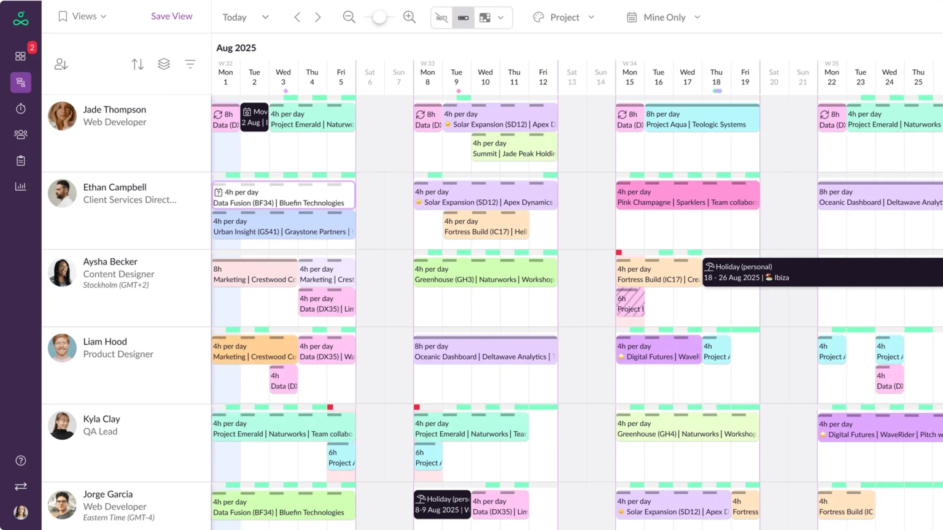
Example of the Resource Guru Schedule.
As Vimaldev pointed out, one of the most valuable aspects of Resource Guru is the ability to drag and drop bookings across the Schedule. This makes reassigning bookings, extending/contracting bookings, and tweaking them on the fly intuitive, helping to speed up the entire process.
Built-in clash management also safeguards against overallocation with features like the Waiting List actively preventing double-bookings and conflicts.
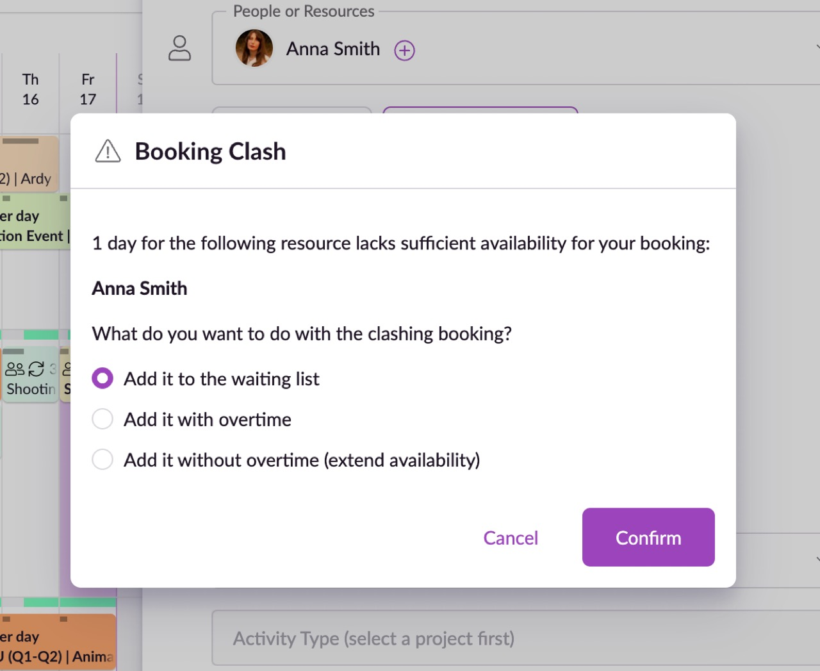
Example of the Resource Guru clash management engine.
The team now see Resource Guru as an invaluable part of their workflows. Vimaldev put it like this:
“If we stopped using Resource Guru tomorrow we’d go back to miscommunication and scheduling conflicts.”
Plus, color-coding makes the Schedule inherently scannable, allowing everyone to differentiate between bookers, clients, projects, activity types, and billable vs. non-billable work at a glance.
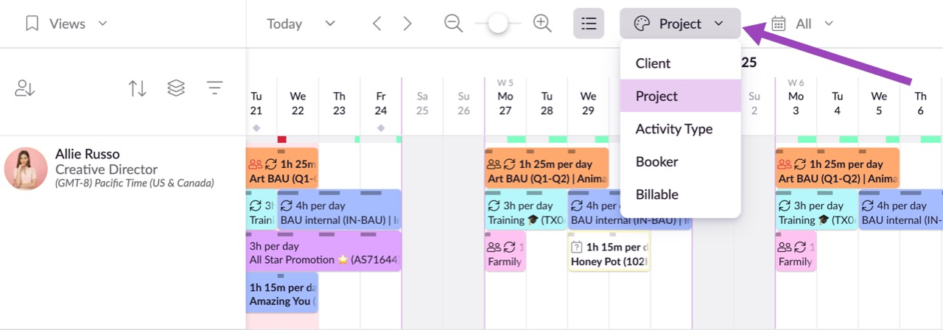
Example of the color-coding options in the Resource Guru Schedule.
Catch up on our recent Office Hours episode where we took a deep dive into color coding here.
Availability tracking
It’s all well and good to know what work is on the roadmap, but it’s not the complete story until you know who has space for that work, and when.
In Steve’s words, Resource Guru “provides a clear, real-time overview of team capacity, which is extremely helpful for planning.”
Sure, plenty of systems point out when someone’s available, but few (if any) go as in-detail as Resource Guru. Custom availability means you can set variable availability that reflects real life on a day-to-day basis, per person on the team. This ensures there are no unknowns or unexpected shifts in availability that go unreflected in the Schedule.
Among the availability tracking features praised by Phases, availability bars make it easy to assess remaining availability simply by hovering over them.
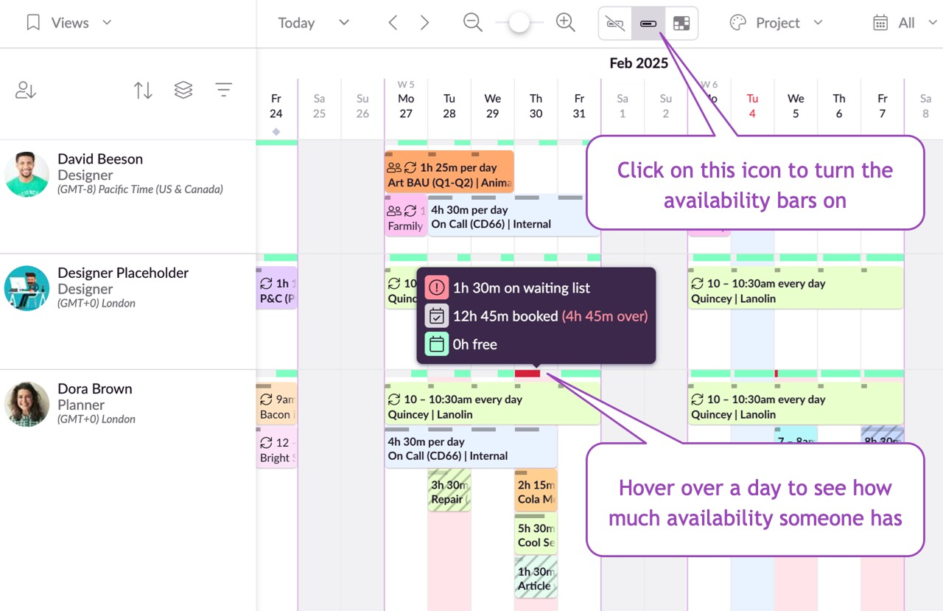
Example of availability bars in action on the Resource Guru Schedule.
And, heatmaps make the whole schedule easy to comprehend in seconds by breaking down each person, placeholder, or resource’s availability by total utilization, billable utilization, and hours remaining.
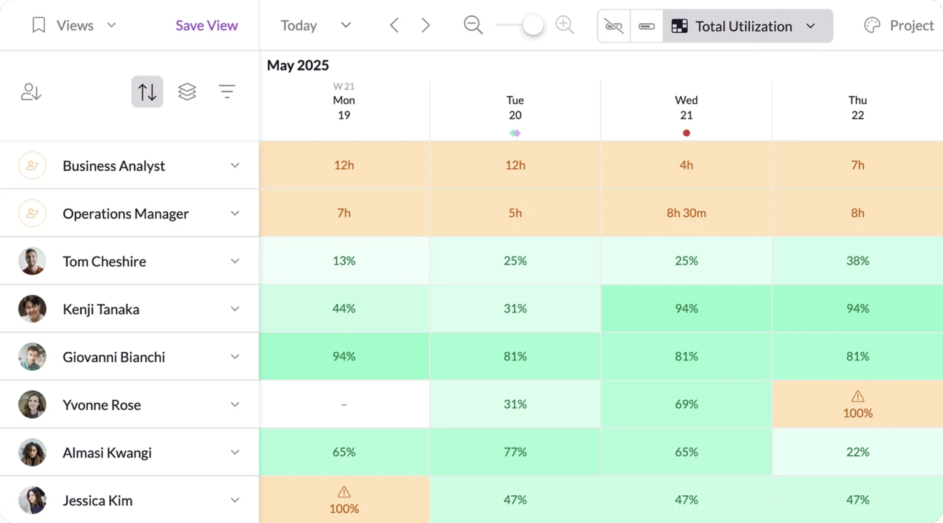
Example heatmap view in Resource Guru.
Time off management
As well as giving Phases insight into availability and capacity, the team also told us “tracking leave and holidays in the same place as project work helps prevent scheduling conflicts.”
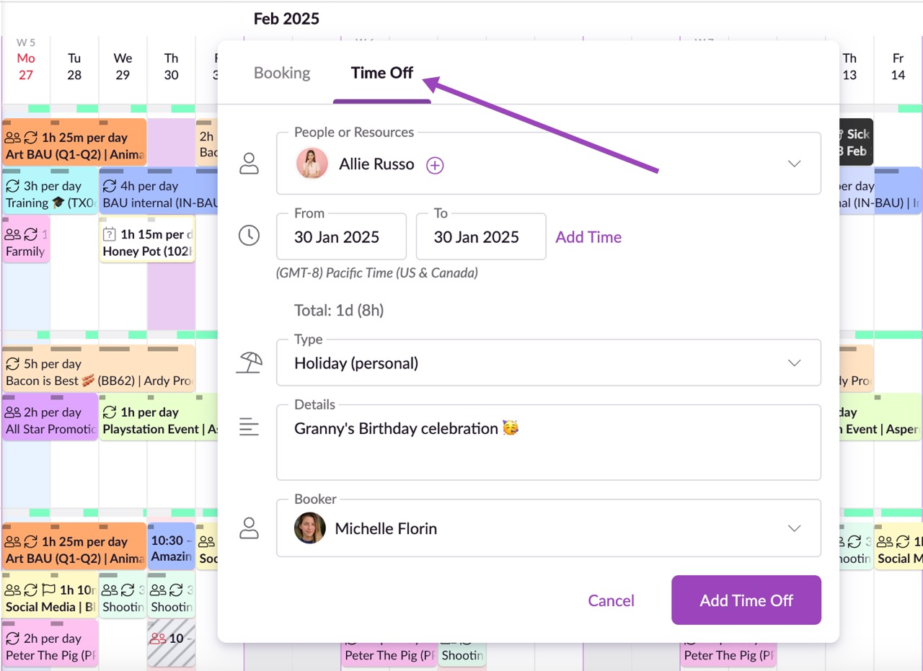
Example of how to set up a time off booking in Resource Guru.
Layering up from its availability features, Resource Guru’s leave management functionality consolidates information on when people are out of office also, regardless of the type of time off they’re taking, including vacation days, sick days, parental leave, compassionate leave, or custom types of leave.
Plus, it’s easy to track this over time to spot popular times for vacations or peak periods for sick leave to plan ahead using the out-of-the-box time off report.
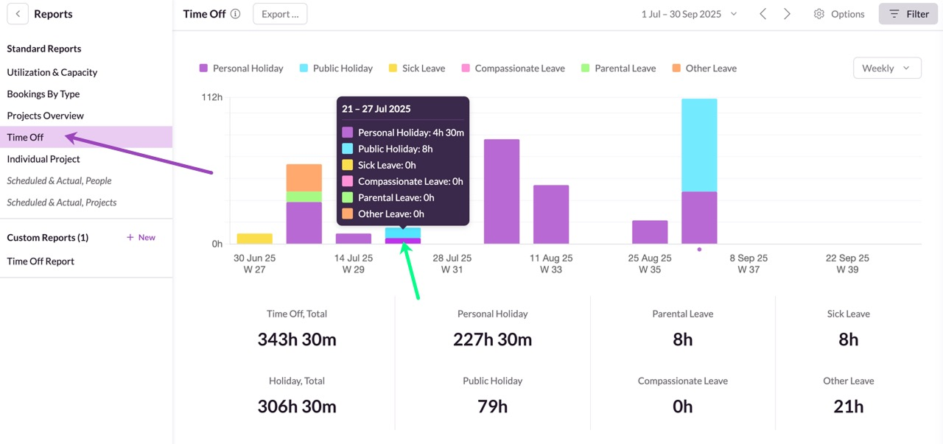
Example of the time off report in Resource Guru.
With these features working in harmony—and many more—Phases now relies on Resource Guru as “an essential tool for staying organized, improving transparency, and ensuring the team works efficiently without burnout.”
Our recent survey and resulting report on overworking shows how widespread issues like this are across the information technology sector.
39% of those surveyed who work in the information technology sector have experienced burnout—11% above average across all sectors, and in the top 3 of all sectors surveyed.
50% of those who reported burnout in this sector said their workload being too high caused their burnout.
A large contributing factor is likely because a whopping 50% of them are using spreadsheets for resource management.
By pivoting to a fully-featured system like Resource Guru, Phases’ story shows that a more flexible, clear approach to resource management helps balance workloads and, ultimately, keep teams productive and motivated.
More about Phases
Customer company | Phases.io |
Company size | >100 |
Company HQ | Melby, Denmark |
Business type | Software development agency |
Try it for yourself
If you’ve faced any of the same challenges Phases did in a pre-Resource Guru world, you can test how the software can solve them for you with a 30-day free trial:

The #1 scheduling tool trusted by thousands of project teams
Join thousands of project managers who have made scheduling a breeze.