

Asana is designed to help people organize projects and track tasks. And, much like Resource Guru, Asana is suitable for marketing and IT teams, among many others. However, there are some drawbacks when it comes to using Asana for all your resource management-related needs. That’s where Resource Guru can fill the gaps.
Asana falls short when it comes to scheduling and time tracking specifically, only offering basic functionality for both. However, you can now get the best of both worlds by combining Asana’s task management capabilities with Resource Guru’s flexible scheduling and comprehensive time tracking functionality.
With that in mind, we’re delighted to announce our new, out-of-the-box integration with Asana. Let’s break it down and explore what’s in it for you.
TL;DR Resource Guru complements Asana by adding accurate scheduling and reliable timesheets that Asana alone can’t provide. Try the Integration for Free →
In this article 📖
How the Asana x Resource Guru integration works
To get started with this integration, you simply need to connect your Asana account to Resource Guru and choose which projects and associated tasks you want to work with.
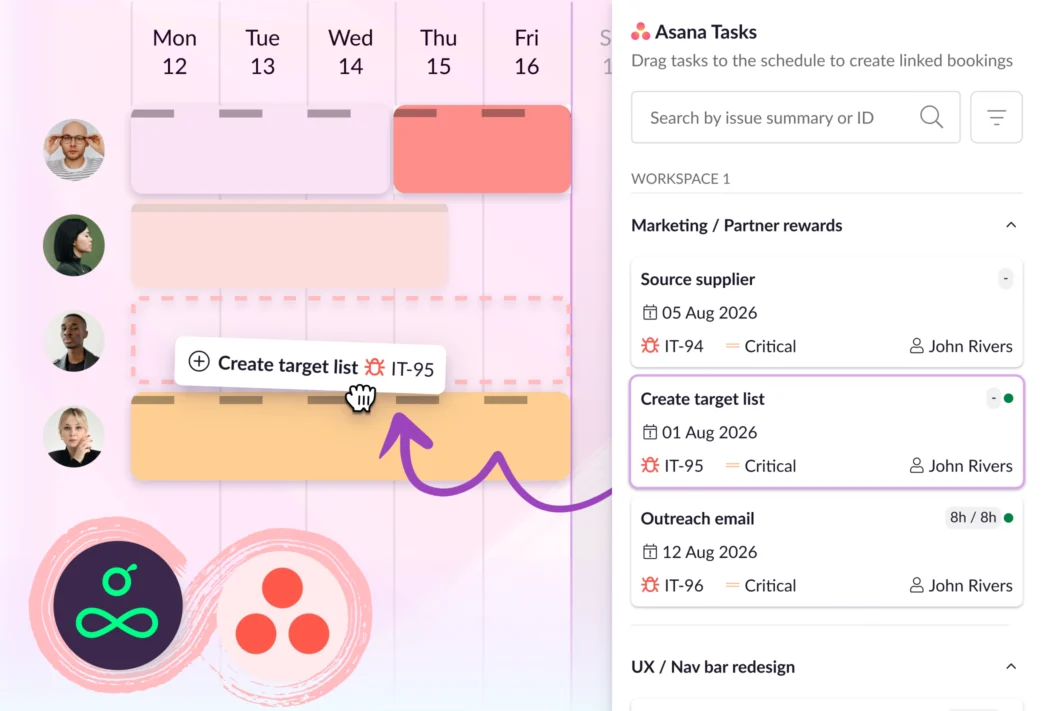
Then, your selected tasks will be imported to Resource Guru via one-way sync and you’ll see a list of Asana tasks in a panel on the schedule, sorted by project. You can also search the list to find exactly the tasks you’re looking for.
From there you can drag and drop a task onto the schedule to create a booking against it and assign it to the best person for the job.
Set it up in a few clicks via the instructions in our Help Center.
How the Asana x Resource Guru integration helps
Embrace flexible scheduling and easy-to-manage capacity
While Asana’s great for managing tasks, and it’s got a basic calendar view, it lacks some key context around who’s available, who’s got space for more work, and who’s overwhelmed.
There are plenty of advantages to using the Resource Guru schedule in combination with Asana to combat those limitations:
- Resource Guru reflects actual availability thanks to features like detailed availability settings and time off management. That way you know who actually has space for the work, instead of assigning without a full view of who’s available
- Resource Guru’s clash management engine actively prevents overbooking by flagging when people and resources don’t have enough availability left to work on the booking you’re trying to assign. This keeps teams productive by preventing them from getting overburdened
- Heatmaps and availability bars let you scan for who has capacity at a glance. This makes it quick and easy to know when the work can get done, not just what work needs to get done
Adopt accurate timesheets and utilization tracking
Asana does have basic time tracking built in, but it does not have a full standalone timesheet feature for the typical weekly timesheet view most teams expect.
Timesheets on Resource Guru auto-fill based on bookings added to the schedule. That way, there’s no guesswork involved when it comes to the end of the week.
Folks can also bulk log their entries for speedy submissions. Then, you can set approvers to double-check timesheets to ensure accuracy.
Data from these timesheets, combined with our reporting suite, makes it easy to analyze scheduled time versus actuals, and utilization versus capacity.
Integrations are available on all Resource Guru plans, and you can test them out for 30 days with a free trial:

The #1 scheduling and time tracking tool trusted by thousands of project teams
Join thousands of project managers who have made scheduling a breeze.
See what’s next for Resource Guru
We’ve got plenty more Resource Guru integrations where this came from, plus many more on the roadmap—including Monday.com and ClickUp. To stay up-to-date with upcoming releases like this, visit our product portal:
Explore our product portal to see what’s planned next and what we’ve already added. Vote on which features are most important to you and submit new ideas to have your say!What’s next for Resource Guru?