



NSPCC stands for “National Society for the Prevention of Cruelty to Children” and they put children first in everything they do—whether that’s supporting families in caring for their children or helping them move on from difficult experiences.
Here’s why their team trusts Resource Guru to help get their life-changing work done:
“Overall, Resource Guru helps me stay organized, plan ahead properly, and make sure I have enough focus time to deliver the kind of creative work our campaigns need.”
In this article 📖
The NSPCC’s experience with Resource Guru: In numbers

“A proper overview of capacity has helped us plan more realistically.
It’s helped improve the accuracy of our scheduling by around 30–40%, simply because we’re no longer guessing or relying on outdated info.”

“Because it’s easy to shift things around and spot crunch points early, our on‑time delivery for creative work has noticeably improved.
I’d say we’ve seen an increase of around 20–25% in delivering work when we originally planned to—particularly on bigger campaigns or brand projects.”

“We save hours every week just by having everyone’s schedule visible and easy to update.
Across the team, that easily adds up to 20–30 hours a month that used to be spent chasing updates, checking availability, or trying to get clarity.”
NSPCC before Resource Guru: Rigid scheduling that couldn’t pivot with creatives
Kathryn is a Senior Designer on the Creative team that creates content and leads brand strategy for both the NSPCC and Childline.
They work across a range of projects—from developing identities for new campaigns, to art direction. That means their schedules can get busy quickly, so having a clear sense of what’s coming up is essential.
Unfortunately, that wasn’t always the case:
“Before Resource Guru, it was really hard to get a clear picture of who was working on what, where the pressure points were, and how much time people realistically had available.
Now, it’s all laid out clearly, which makes planning so much easier and a lot fairer.”
While Kathryn and her team were already using a dedicated scheduling tool beforehand, her comparison between it and Resource Guru made it clear that not all solutions in this space are created equal:
“It wasn’t very intuitive, and individuals couldn’t amend their own time or bookings. That slowed the whole process down and made even small changes feel like a bit of a chore.
It was also much less flexible when it came to adding or adjusting bookings. In a creative team where plans change constantly—new ideas, shifting deadlines, reactive projects, production needs—that lack of flexibility caused a lot of friction.”
Next, let’s check out how that pivoting process—and their entire scheduling approach—looks in a post-Resource Guru world.
NSPCC with Resource Guru: Clear scheduling that gets projects over the line
“Resource Guru has solved a lot of the day-to-day challenges that come with working in a busy creative team. One of the biggest improvements has been around visibility, both of my own workload and the team’s.”
Kathryn noticed an “immediate difference” when the team implemented Resource Guru. They were able to get up and running quickly, and that pace has continued ever since.
Specifically, she called out how much easier it is to use than their previous solutions, particularly when it comes to making adjustments to the team’s schedule. She describes the whole process as “quick and painless” and “far more suited to how a creative team actually works.”
“I use Resource Guru every day to keep track of my workload and plan my time realistically. Being able to see my week laid out in a way that actually makes sense helps me balance big creative tasks alongside the more reactive things that pop up.”
In the next section, we’ll cover the specific features that have helped them achieve this.
Key features valued by NSPCC
The schedule
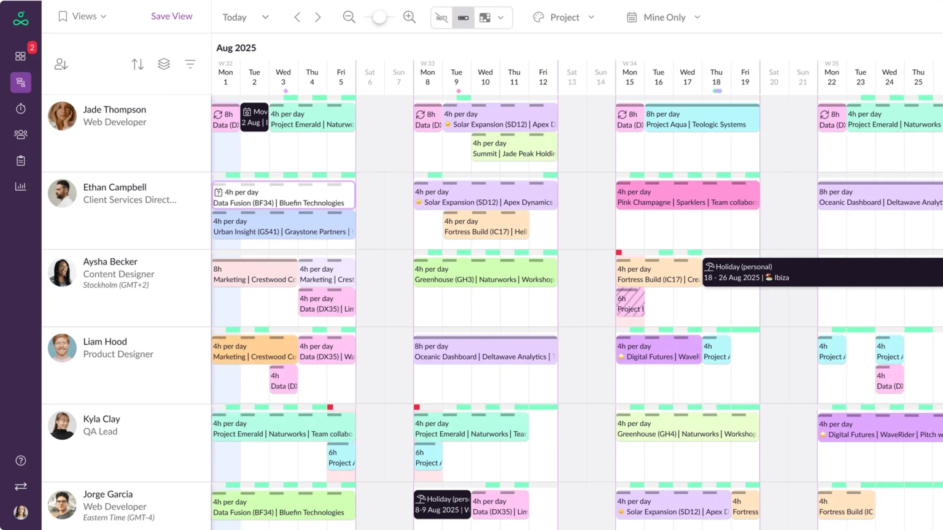
“The schedule view is clear and easy to understand—nothing overcomplicated.”
The Resource Guru schedule gives you insight into essential information around bookings, capacity, time off, and utilization, all across your team.
Here are just some of the ways it makes scheduling straightforward and especially suitable for in-demand teams like Kathryn’s:
- Capacity planning features like heatmaps and availability bars mean everyone’s actual space for work is reflected on the schedule at all times
- Color-coding makes it easy to scan for particular projects, clients, and the split of billable versus non-billable work
- Saved views mean you can configure the schedule and save those exact settings to revisit, whether you want to filter, group, or sort the schedule to highlight the most important information
There’s also one particular part of the Resource Guru schedule that Kathryn and her team see as a major time-saver. More on that next.
Pinning
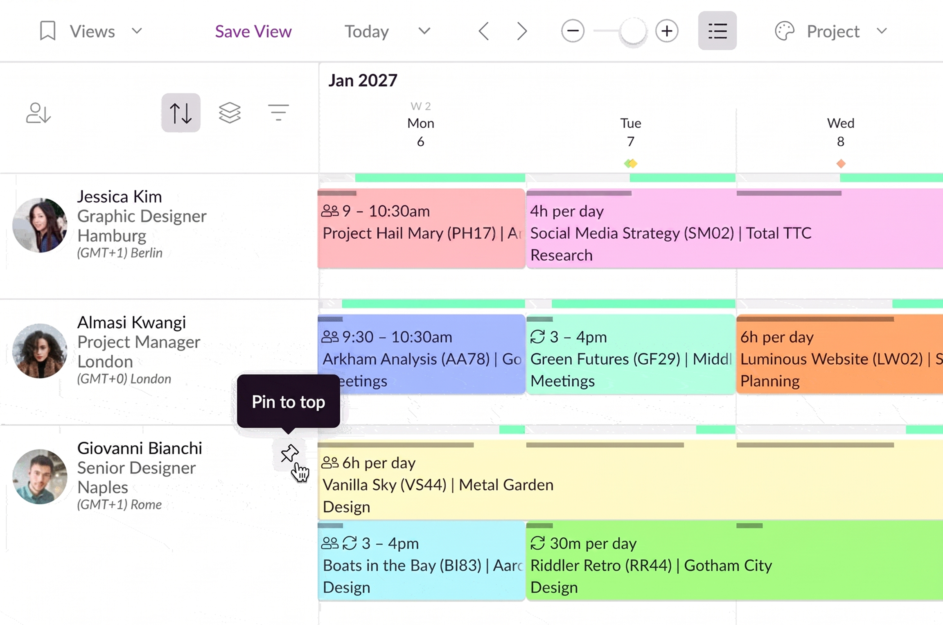
“The pinning feature alone has probably saved me at least a couple of hours a week that would otherwise have gone into scrolling, cross‑checking, and manually comparing schedules.”
Pinning in Resource Guru is fairly self-explanatory. You can simply hover over a person or resource on the schedule and click the pin icon to ensure they stay at the top, regardless of other filters or settings you’ve applied.
There are a few handy use cases for this:
- Pin yourself so your workload is always the first thing you see
- Pin two people to compare their schedules side-by-side
- Pin everyone on your team since you’ll likely be sharing projects with them, or scheduling them most frequently
The benefit of all the above, in Kathryn’s words:
“The pinning feature has helped us collaborate better by making schedule comparisons quick and easy. This level of team visibility helps us manage capacity fairly and avoid overloading people.”
Drag and drop editing
Throughout our conversation with Kathryn, one theme kept coming up time and again: Things move quickly in creative teams, and those teams have to be able to adapt almost instantly, or risk projects slipping.
“Drag-and-drop editing makes it simple to adjust things when plans change.”
Using Resource Guru, they can simply drag and drop to reorganize their schedule to reflect any necessary changes.
There are also some complementary features that make this approach to scheduling even more powerful:
- Splitting bookings lets you spread effort across multiple days in a couple of clicks
- Multiple zoom levels facilitate viewing the schedule across as far as multiple months or just the week at hand—whichever is most convenient
- Keyboard shortcuts like holding Shift while dragging a booking let you copy bookings and perform other common actions quickly
All these features combine to make scheduling seamless and time-saving for fast-paced teams like Kathryn’s. The team heavily relies on Resource Guru now, considering it an essential part of their processes:
“If we stopped using Resource Guru tomorrow, we’d feel it straight away. We’d lose that clarity and shared visibility, and it would be much harder to judge capacity or plan realistically. Things would slip back into guesswork, lots of back‑and‑forth, and probably a fair bit of overbooking without realizing it.”
More about the NSPCC
Customer company | NSPCC |
Company size | 2,000+ |
Company HQ | London, UK |
Business type | Non-profit organization |
Try it for your organization
If you’ve faced any of the same challenges as the NSPCC, test how Resource Guru can help you solve them with a fully-featured free trial:

The #1 scheduling tool trusted by thousands of project teams
Join thousands of project managers who have made scheduling a breeze.