


According to survey data from our State of (Over)working report 2025, 28% of teams are still relying on Google Sheets for their resource scheduling and planning. For project managers, studio managers, and operations leads moving off that spreadsheet, a Gantt chart tool is usually the first stop.
Resource Guru is featured in this list and is its publisher.
In this article 📖
Best Gantt chart software at a glance
- Resource Guru: Best for Gantt-style planning tied to real resource capacity
- TeamGantt: Best for teams that want pure Gantt chart functionality
- Microsoft Project: Best for organizations standardized on the Microsoft ecosystem
- Teamwork.com: Best for agencies managing client work alongside their schedule
- Airtable: Best for teams that want a Gantt view inside a flexible database
Compare Gantt chart software at a glance
Tool | Best for | Starting price | Free trial |
Resource Guru | Gantt-style planning tied to capacity | $6/person/month ($5 monthly billed annually) | 30 days, no card |
TeamGantt | Gantt charts as the main event | Free plan; paid from $24/month | 14 days, no card |
Microsoft Project | Microsoft-standardized organizations | $10/user/month | No self-serve trial |
Teamwork.com | Agencies managing client work | Free plan; paid from $9.99/user/month (minimum of 3 users) | 14 days, no card |
Airtable | Gantt view inside a flexible database | Free plan; paid from $20/user/month | 14-day Team trial |
Pricing checked against vendor pages on publication.
What to look for in Gantt chart software
Weigh these against how your team actually plans:
- Dependency and critical path support, so a slipped task moves everything downstream
- Whether the tool reads live capacity, or just draws bars against a calendar
- Whether the free trial or free plan lets you actually build a real Gantt chart, not just click through a demo capped at one project
- Pricing that starts low and grows predictably per user or per project, without forced jumps to a much pricier tier as your team expands
“While a Gantt chart will display the projected time needed for the project and mark if there is enough time for other assignments, it does not reflect the team’s actual hours…
A project’s timeline can appear to be within the deadline, but if someone is authorized to approve the project before launch, they may have several projects in the review phase, and all of them can suffer from delays. I noticed that if over 80 percent of the person’s hours are taken, even unplanned activities can create a delay.”
The best Gantt chart software reviewed
The tools below split into two camps: Gantt-first products where the chart is the main workspace (TeamGantt, Microsoft Project), and broader platforms where Gantt is one piece of the puzzle among several (Resource Guru, Teamwork.com, Airtable).
1. Resource Guru: Best for Gantt-style planning tied to real resource capacity
Reviewer ratings: 4.6/5 on G2 (470+ reviews) and 4.7/5 on Capterra (540+ reviews).
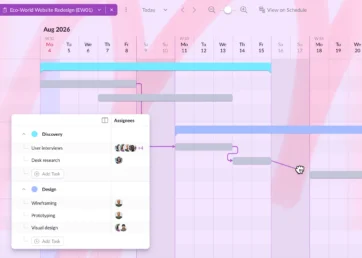
Resource Guru is resource management and capacity planning software offering Gantt charts as a part of the product. Phases, tasks, and dependencies sit in the same tool as the team’s actual availability.
Standout features
- Gantt charts with phases, tasks, milestones, and dependencies, editable by drag and drop
- Clash management that flags double-bookings and alerts managers to schedule conflicts in real time
Limitations
- No native critical path calculation for large, multi-hundred-task programs
- Non-human resources like rooms and equipment are billed per item
Pricing
Gantt charts aren’t available on the Grasshopper plan. So pricing (annual billing) starts as $8 for Blackbelt and goes up to $12 for Master. A 30-day free trial is available with no credit card required.

Plan with Gantt charts. Deliver with smart scheduling.
Join thousands of managers using Resource Guru to plan projects and schedule people in one place.
2. TeamGantt: Best for teams that want pure Gantt chart functionality
Reviewer ratings: 4.8/5 on G2 (890+ reviews) and 4.6/5 on Capterra (200+ reviews).
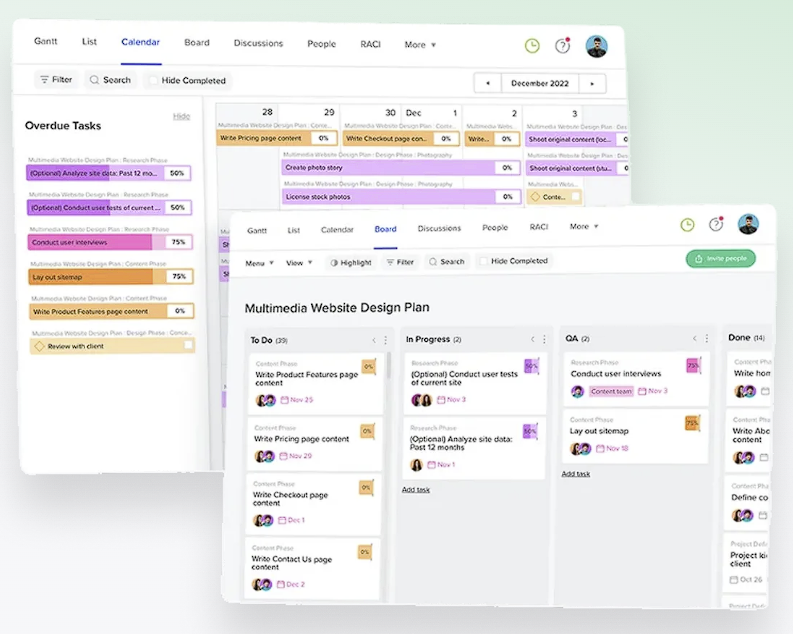
TeamGantt builds everything around Gantt charts, which suits teams whose primary planning artifact is the timeline rather than a task board.
Standout features
- An AI-powered Gantt chart maker that drafts an initial timeline from a written project brief
- Drag-and-drop dependencies, critical path highlighting, and lockable milestones on Business plans
Limitations
- Project-based pricing climbs quickly once a team runs more than a few active projects
- Resource management is lighter than some others listed in this article, with no cross-project clash detection
Pricing
A free plan covers one project and 40 tasks. Paid plans start at $24/month for Basic, rising to $120/month for Business. A 14-day free trial is available.
3. Microsoft Project: Best for organizations standardized on the Microsoft ecosystem
Reviewer ratings: 4.0/5 on G2 (1,600+ reviews)
Microsoft Project, now sold as Planner and Project plans, is the default choice for organizations on Microsoft 365. Gantt charts and dependencies connect natively to Teams, SharePoint, and Power BI.
Standout features
- Deep dependency logic, including resource leveling and baseline tracking
- Native integration with Teams, SharePoint, and Power BI for Microsoft 365 organizations
Limitations
- No self-serve free trial; most buyers evaluate via an existing Microsoft relationship
- Plan 1 lacks the desktop app and resource management features most project managers actually need (like resource leveling or custom cost rates), offering only a web-based interface and basic task assignment features
Pricing
Plan 1 is $10/user/month for basic web scheduling, Plan 3 is $30 for the desktop app and resource management, and Plan 5 is $55 for portfolio management.
4. Teamwork.com: Best for client-facing teams who need integrated financial management
Reviewer ratings: 4.4/5 on G2 (1,200+ reviews) and 4.5/5 on Capterra (900+ reviews).
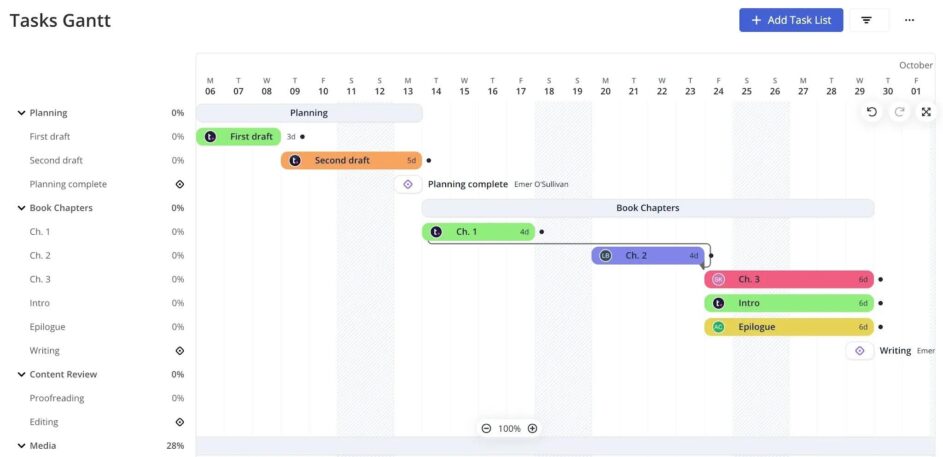
Teamwork.com connects your project schedule (via Gantt charts) directly to your finances, allowing you to track budgets, manage client retainers, and generate invoices all in one tool.
Standout features
- Gantt chart, table, list, and board views on every paid plan, with dependencies and filtering
- Connects employee time logs directly to your bottom line, using logged hours to automatically update hourly budgets, track retainers, and streamline client invoicing
Limitations
- Capacity planning and live workload views only unlock on the Accelerate plan and above
- Advanced resourcing by skill or role sits behind the higher-priced Optimize plan
Pricing
A free plan covers up to 5 users and 5 projects. Paid plans start at $9.99/user/month for Basics, $24.99 for Accelerate; Optimize and Enterprise are quote-based. A 14-day free trial is available.
5. Airtable: Best for teams that want a Gantt view inside a flexible database
Reviewer ratings: 4.6/5 on G2 (3,200+ reviews) and 4.6/5 on Capterra (2,200+ reviews).
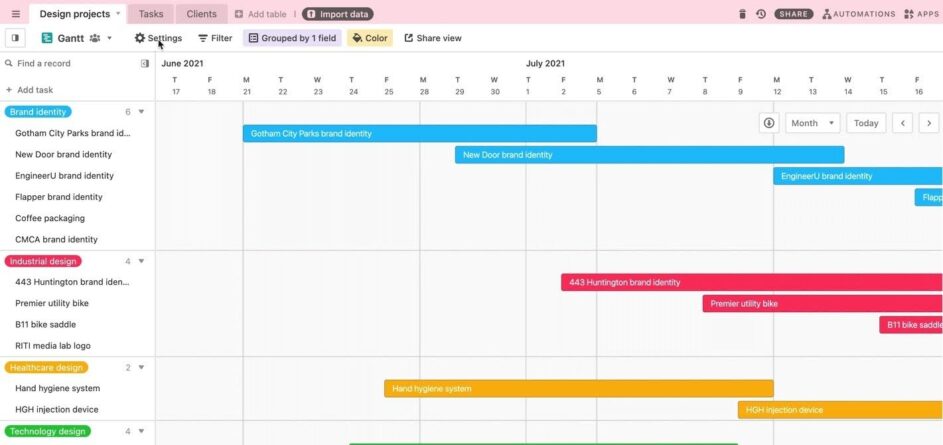
Airtable is a database with a Gantt chart layered on top. For teams already running project data in an Airtable base, adding a timeline view costs nothing extra.
Standout features
- Gantt and Timeline views that read directly from existing base records, no re-entry needed
- Unlimited read-only viewers on every plan, useful for stakeholder-heavy teams
Limitations
- Gantt functionality is thinner than in dedicated tools, with no critical path out of the box
- Per-editor pricing gets expensive fast once a base needs more than a few collaborators
Pricing
The Free plan covers 5 editors and 1,000 records per base. Team is $20/user/month billed annually ($24 monthly), Business is $45 ($54 monthly). New workspaces get an automatic 14-day Team trial.
Why Gantt charts alone don’t solve capacity problems
A Gantt chart shows when work should happen. It doesn’t show whether the people assigned have the hours to do it. Our comparison of monday vs. Asana covers why treating a Gantt chart as a substitute for capacity planning leads to overcommitted teams, a pattern that repeats across the tools above.
“Our Gantt showed three ‘green’ bars for QA across projects, so the schedule looked feasible. In reality the lead QA was double-booked across those bars; the tool treated them as independent tasks and never surfaced a utilization overload or required skill match.
A critical regression slipped through, the store submission failed, and the release slipped two weeks… If your scheduling tool can’t answer ‘who is actually available to do this work today, with the right skills,’ it will keep letting similar moments surprise you.”
Most of the tools above let a manager build a fully dependent Gantt chart with zero visibility into what else the assignee is booked on. Our guide to capacity planning tools covers that gap in more depth.
How do you choose the right Gantt chart tool?
The right Gantt chart tool pick depends on what the chart needs to sit next to.
- Currently on spreadsheets, want dedicated software: TeamGantt or Airtable
- Managing client budgets alongside timelines: Teamwork.com
- Standardized on Microsoft 365 already: Microsoft Project
- Juggling people across projects: Resource Guru
“I went through three or four scheduling platforms before we settled on what we use now. Every single one could show me what jobs were booked for the day, but not a single one could tell me if the right technician was actually free to take that job…
The fix for us came from moving to a resource capacity tool… and that distinction is what most teams miss when they go looking for software.”
If the gap is broader than Gantt charts alone, our guide to best project scheduling software covers the wider category.
Frequently asked questions
Which software is best for Gantt chart?
The best Gantt chart software depends on what it needs to connect to. TeamGantt suits teams that want the chart as the main workspace, while Resource Guru suits teams that need it tied to real resource capacity.
Is there free Gantt chart software?
Yes, free Gantt chart software is available. TeamGantt offers a free personal plan, Airtable and Teamwork.com include Gantt views on their free tiers, and most paid tools offer a free trial.
Is Microsoft Project better than Excel?
Microsoft Project is generally better than Excel for teams managing dependencies, resource leveling, or multiple related projects, since Excel requires rebuilding timelines by hand. Excel remains reasonable for a single small project. That said, if you are not already using the Microsoft suite, an alternative may be the better option for you.
Start planning with the right tool
Picking the right Gantt chart software comes down to what it has to work with: a database, a client budget, a Microsoft stack, or a live view of who’s free to do the work. Getting that match wrong is what sends teams back to an error-prone spreadsheet.
“Our unified project Gantt looked immaculate… In reality… we had 29 moving jobs rescheduled in one week, totaling approximately $9,600 in lost revenue and overtime expenses… 50% of what the Gantt considered as our ‘Available Capacity’ turned out to be fake…
We then switched to an adaptive capacity planning software tool… Our rescheduling numbers went down by more than 60% while our on-time job completion rates went up from 91% to 97.5%.”
If unclear capacity planning is the gap in your current setup, start a free trial of Resource Guru and see your team’s Gantt chart alongside their real availability.
All details accurate as of October 1st, 2026.
Plan with Gantt charts. Deliver with smart scheduling.
Join thousands of managers using Resource Guru to plan projects and schedule people in one place.